---
generated_by: gdlink-build
generated_at: 2026-06-23T12:34:28Z
do_not_edit: true
title: Game
brick_type: executor
tier: Basic
generated: true
---
# Game
**Category:** Executor
**Tier:** Basic
## Purpose
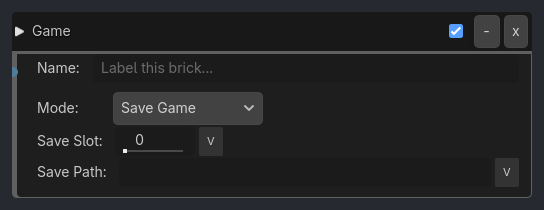
Manages game-level operations including Global Variable save slots, pause/resume, time scale, restart, and quit.
## Visual Reference
```{raw} html
```
## When To Use
**Save Game on Checkpoint**
```
Collision(Checkpoint) -> AND -> Game(mode=Save Game, slot=0, file=autosave.dat)
// Auto-save when player touches checkpoint
```
**Manual Save (Press F5)**
```
Keyboard(F5, Press) -> AND -> Game(mode=Save Game, slot={current_slot})
// Player presses F5 to save
```
**Load Game on Menu**
```
Message(load_game_slot_0) -> AND -> Game(mode=Load Game, slot=0)
Message(load_game_slot_1) -> AND -> Game(mode=Load Game, slot=1)
// Load game from main menu
```
**Pause Menu (ESC key)**
> Sample inspector layout removed for compatibility.
**Death & Restart**
> Sample inspector layout removed for compatibility.
**Quit Confirmation**
> Sample inspector layout removed for compatibility.
**Quick Save Slots**
```
Keyboard(F5, Press) -> AND -> Game(mode=Save Game, slot=0) # Quick save
Keyboard(F6, Press) -> AND -> Game(mode=Save Game, slot=1) # Manual save 1
Keyboard(F7, Press) -> AND -> Game(mode=Save Game, slot=2) # Manual save 2
Keyboard(F9, Press) -> AND -> Game(mode=Load Game, slot=0) # Quick load
// Multiple save slots with hotkeys
```
## Runtime Behavior
**Executes**: When activated, performs game state management operations
```{raw} html
```
## Properties
| Property | Type | Default | Notes |
|---|---|---|---|
| Mode | option | Save Game | Game operation. Toggle Fullscreen on web must be triggered from a UI Click / Touch listener (browser requires user-gesture). |
| Save Slot | int | 0 | Global Variables save slot number |
| Save Path | string | | [Optional] Directory or .gdvar file path for Global Variables saves. Blank uses user://gdlink_saves/global_slot_.gdvar. |
| Time Scale | float | 1.0 | Game speed multiplier (0.01-10.0) |
## Notes
**Save File Location**
**user://** directory locations:
- **Windows**: `%APPDATA%\Godot\app_userdata\[project_name]\`
- **Linux**: `~/.local/share/godot/app_userdata/[project_name]/`
- **macOS**: `~/Library/Application Support/Godot/app_userdata/[project_name]/`
**Multiple Save Slots**
Support 10 slots (0-9) for:
- Slot 0: Auto-save / Quick save
- Slots 1-3: Manual saves
- Slots 4-9: Additional saves
**Save Game Best Practices**
1. **Auto-save frequently**: At checkpoints, level transitions
2. **Show save icon**: Visual feedback when saving
3. **Don't block gameplay**: Save in background if possible
4. **Validate on load**: Check version, handle corruption
5. **Backup saves**: Keep previous save as backup
6. **Compress large saves**: Use GZIP compression
7. **Test load thoroughly**: Ensure all state is restored correctly
**What NOT to Save**
- Temporary/cached data
- References to nodes (save paths instead)
- Signals/connections (recreate on load)
- Resource files (use paths)
- Coroutines/tweens (restart on load)
---
**Last Updated**: November 3, 2025
**Version**: Design Spec for v0.9.0+