---
generated_by: gdlink-build
generated_at: 2026-06-23T12:34:28Z
do_not_edit: true
title: Label
brick_type: executor
tier: Basic
generated: true
---
# Label
**Category:** Executor
**Tier:** Basic
## Purpose
Writes formatted text into a target UI node.
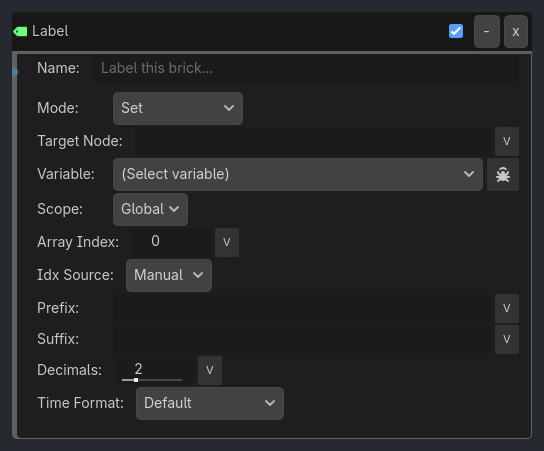
## Visual Reference
```{raw} html
```
## Runtime Behavior
**Inputs**
- **Activate** (Boolean): Writes the formatted text when triggered.
**Properties**
- **property_name** (String, `""`)
- Variable name to read and display.
- **scope** (Enum, `Global`)
- `Local`: reads from the target host node's `metadata/local_variables`.
- `Global`: reads from `/root/GDLinkGlobals`.
- **prefix** (String, `""`)
- Prepended before the resolved value.
- **suffix** (String, `""`)
- Appended after the resolved value.
- **decimals** (Int, `2`)
- Decimal precision applied to float values.
- **target_node** (String, `""`)
- Optional node identifier for the label/readout target.
- Empty string means "write to the executor's host node".
```{raw} html
Skip on Retrigger
Auto-advance
Loop
Expose State
Verbose
```
## Properties
| Property | Type | Default | Notes |
|---|---|---|---|
| Mode | option | Set | Set writes a value/literal once. Typewrite reveals String, Number, Array, or Narration data character-by-character. Goto Narration jumps to a specific entry index (NPC dialog branching). |
| Target Index | int | 0 | [Goto Narration] Zero-based index of the Narration entry/group line to jump to. |
| Target Node | string | | Name of Label/Label3D/RichTextLabel node (empty = self) |
| Variable | variable_name | | Variable to display |
| Scope | option | Global | Variable scope |
| Array Index | int | 0 | If Variable is an Array, display this element |
| Idx Source | option | Manual | Manual uses Array Index. Variable reads an Integer variable. |
| Idx Var | variable_name | | Integer variable used as the Label array index |
| Idx Scope | option | Local | |
| Prefix | string | | Text before value |
| Suffix | string | | Text after value |
| Decimals | int | 2 | Decimal places for floats |
| Time Format | option | Default | Render Float/Int values (and Array elements) as durations in the chosen format. Default uses Decimals. |
| Chars/sec | float | 30.0 | Default reveal speed in characters per second |
| Source | option | Slots | Slots: 4 flat data variables. Group: a single Array/Narration Group variable played line-by-line. |
| Group Var | variable_name | | Array or Narration Group variable played line-by-line |
| Group Scope | option | Local | |
| Array Index | int | 0 | If a Typewrite slot variable is an Array, reveal this element |
| Idx Source | option | Manual | Manual uses Array Index. Variable reads an Integer variable. |
| Idx Var | variable_name | | Integer variable used as the Typewrite array index |
| Idx Scope | option | Local | |
| Data 1 | variable_name | | Variable holding String, Number, Array, or Narration data (BBCode + {Tokens} OK for text) |
| Scope 1 | option | Global | |
| Speed 1 | float | 0.0 | Per-entry speed override (0 = use default Chars/sec) |
| Data 2 | variable_name | | Variable holding String, Number, Array, or Narration data (BBCode + {Tokens} OK for text) |
| Scope 2 | option | Global | |
| Speed 2 | float | 0.0 | Per-entry speed override (0 = use default Chars/sec) |
| Data 3 | variable_name | | Variable holding String, Number, Array, or Narration data (BBCode + {Tokens} OK for text) |
| Scope 3 | option | Global | |
| Speed 3 | float | 0.0 | Per-entry speed override (0 = use default Chars/sec) |
| Data 4 | variable_name | | Variable holding String, Number, Array, or Narration data (BBCode + {Tokens} OK for text) |
| Scope 4 | option | Global | |
| Speed 4 | float | 0.0 | Per-entry speed override (0 = use default Chars/sec) |
| Skip on Retrigger | bool | True | If a re-trigger arrives while still revealing, snap to fully revealed instead of advancing |
| Auto-advance | bool | False | Automatically advance to the next narration entry after Auto Delay seconds |
| Auto Delay | float | 1.5 | Seconds to wait after a narration entry completes before auto-advancing |
| Loop | bool | False | After the last narration entry, restart from the first |
| Only Lines | string | | Optional comma-separated 0-based indices (e.g. "0,2,4"). When non-empty, Typewrite advances only through these entries in order. Empty = play all in sequence. |
| Expose State | bool | False | Write narration runtime state (index, is_playing, is_finished, chars_revealed, total_chars) to a variable namespace each tick — drives sound-on-character / per-line callbacks. |
| State Prefix | string | narration | Variable namespace for exposed narration state. Writes {prefix}_index, {prefix}_is_playing, etc. |
| State Scope | option | Local | Where to write exposed narration state. |
| Verbose | bool | False | Log Label operations (controlled by ladybug button) |
## Example Use Cases
**Timer / System Time HUD**:
1. Use a `Timer` variable and `Timer` executor for gameplay timers.
2. Add a `Label` executor with `property_name = race_timer`, `scope = Local`, and `target_node` pointing at the HUD label. Timer dictionaries render using their stored `format`.
3. For wall-clock text, use Set mode with `text_content = "{_system_time.hms}"` or `"{_system_time.formatted}"`.
`Clock` listener remains registered for old scenes, but new authoring should read Timer variables or `_system_time` directly.