---
generated_by: gdlink-build
generated_at: 2026-06-23T12:34:28Z
do_not_edit: true
title: Math
brick_type: executor
tier: Basic
generated: true
---
# Math
**Category:** Executor
**Tier:** Basic
## Purpose
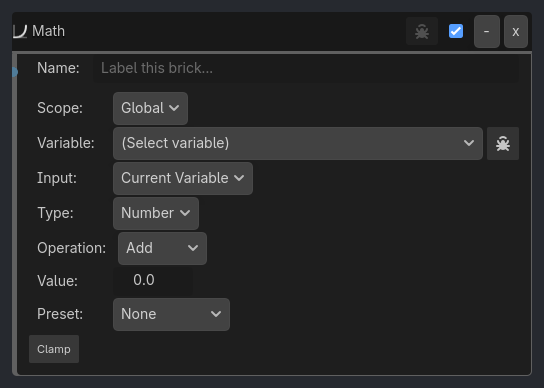
Performs native math against Local or Global variables.
## Visual Reference
```{raw} html
```
```{raw} html
```
## Properties
| Property | Type | Default | Notes |
|---|---|---|---|
| Scope | option | Global | Global: Modify shared variables. Local: Modify this node's variables |
| Variable | variable_name | | Variable to modify |
| Input | option | Current Variable | Current Variable: operate on the destination variable. Source Variable: read one variable and write the result into another. |
| Src Scope | option | Local | Source variable scope when Input is Source Variable |
| Source Var | variable_name | | Variable to read before applying the math operation |
| Type | option | Number | Choose the authored value shape. Math handles numbers, vectors, array numeric/index operations, and Timer variable time adjustments. |
| Operation | option | Add | Math operation to perform on the variable |
| Value | float | 0.0 | Value to use in the operation |
| Preset | option | None | Optional post-operation unit conversion for numeric results |
| Operation | option | Set | Vector operation |
| Value | vector2 | [0, 0] | Vector2 value |
| Value | vector3 | [0, 0, 0] | Vector3 value |
| Scalar | float | 1.0 | Scalar multiplier for Scale operation |
| Operation | option | Length | Length: number of elements. Get At: read one element by Index. Set At: write one element by Index (typed). Sum / Average / Min / Max: aggregate over numeric (Integer/Float) elements, skipping non-numeric entries. |
| Index | int | 0 | Index used by Get At / Set At |
| Value Type | option | Float | Literal value type written by Array Set At |
| Integer | int | 0 | Integer value written by Set At |
| Float | float | 0.0 | Float value written by Set At |
| Boolean | bool | False | Boolean value written by Set At |
| Text | string | | String/resource path written by Set At |
| Vector2 | vector2 | [0, 0] | Vector2 value written by Set At |
| Vector3 | vector3 | [0, 0, 0] | Vector3 value written by Set At |
| Color | color | [1, 1, 1, 1] | Color value written by Set At |
| Array | string | [] | Array literal written with Godot/JSON-style syntax, for example [1, "res://audio.wav"] |
| Clamp | bool | False | Apply min/max constraints after operation |
| Min | float | 0.0 | Minimum allowed value |
| Max | float | 100.0 | Maximum allowed value |
| Operation | option | Add Seconds | Timer dictionary field to modify |
| Seconds | float | 0.0 | Value in seconds for the timer operation |
| Verbose | bool | False | Log Math operations (controlled by ladybug button) |
## Notes
- Destination variables are created automatically when missing
- Division by zero is a safe no-op
- `Clamp` uses brick min/max values, then the final write still respects variable-schema constraints if they exist
- Source-variable mode works for Number, Vector2/Vector3, and Array
- Array `Set At` can write integers, floats, booleans, strings/resource paths, vectors, and nested arrays without coercing everything to float.