---
generated_by: gdlink-build
generated_at: 2026-06-23T12:34:28Z
do_not_edit: true
title: Path
brick_type: executor
tier: Basic
generated: true
---
# Path
**Category:** Executor
**Tier:** Basic
## Purpose
Directs objects along curved paths using Godot's built-in Path3D or Path2D nodes.
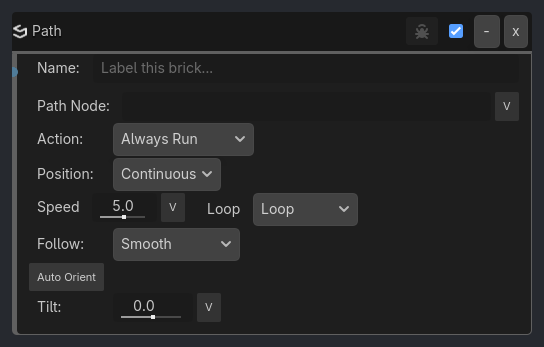
## Visual Reference
```{raw} html
```
## When To Use
- Moving platforms patrolling back and forth (`Ping-Pong` or `Manual` loop mode).
- Circular saw blades following a track (`Loop` mode).
- Conveyor belt items.
- Camera dollies and rail shooters (`Absolute` position mode with variable-driven progress).
- Cinematic follow-sequences pointing strictly at a fixed global constraint.
- Elevators or doors triggered to move A->B, then B->A on separate events (`Manual` loop mode with `Toggle Direction` trigger).
- Banked racing vehicles on curves (using `tilt` for visual banking).
- Cutscene camera positions (using `Absolute` mode with progress set via variables or triggers).
- Random spawn points along a path (`Snap to Points` with `target_point` driven by Random brick).
```{raw} html
Auto Orient
Axis+Z (Forward)
SpaceLocal
Verbose
```
## Properties
| Property | Type | Default | Notes |
|---|---|---|---|
| Path Node | string | | Shared 2D/3D path node. Use Path2D or PathFollow2D on 2D hosts, Path3D or PathFollow3D on 3D hosts. |
| Action | option | Always Run | Always Run: Execute continuously. Start: Begin/resume. Stop: Pause. Toggle Direction: Reverse |
| Position | option | Continuous | Continuous: Move based on speed. Absolute: Set position directly via progress |
| Progress | float | 0.0 | Normalized position on curve (0.0 = start, 1.0 = end) |
| Speed | float | 5.0 | Movement speed (units/sec) |
| Loop | option | Loop | Behavior when reaching the end of the path. Manual: No auto-reverse, use Toggle Direction action |
| Follow | option | Smooth | Follow the smooth curve or snap directly to control points |
| Target Pt | int | 0 | Target curve point index (0-based) |
| Ease | option | Linear | Easing curve for point-to-point movement |
| Auto Orient | bool | False | Rotate to face path direction |
| Axis | option | +Z (Forward) | Forward axis to align to path |
| Space | option | Local | Orientation coordinate space |
| Orient Spd | float | 10.0 | Rotation interpolation speed (0 = instant) |
| Tilt | float | 0.0 | Banking/rolling rotation around path tangent (degrees) |
| Verbose | bool | False | Log path progress, mode, and position each tick (throttled) |
## Example Use Cases
**Patrolling Enemy (Automatic Ping-Pong)**:
```
Always -> Path Executor (path_node="PatrolPath", speed=5.0, loop_mode="Ping-Pong", auto_orient=true, orient_axis="-Z (Forward)")
// The enemy will march to the end of the line, turn around, and march back repeatedly.
```
**Elevator (Manual Bi-directional)**:
```
Keyboard (E) -> Gate (AND) -> Path Executor (path_node="ElevatorPath", trigger_action="Always Run", speed=2.0, loop_mode="Manual")
Keyboard (Q) -> Path Executor (path_node="ElevatorPath", trigger_action="Toggle Direction")
// E: moves elevator along path in current direction (stops at end in Manual mode)
// Q: reverses direction for next E press
```
**Elevator (Start/Stop Control)**:
```
Always -> Path Executor (path_node="ElevatorPath", trigger_action="Always Run", speed=2.0)
Keyboard (Space) -> Path Executor (path_node="ElevatorPath", trigger_action="Start")
Keyboard (Space) -> Path Executor (path_node="ElevatorPath", trigger_action="Stop")
// Space: toggles between running and paused states
// Note: First Space triggers both Start and Stop, but Start sets running=true, then Stop sets running=false, so it stops.
// Better pattern: use separate keys or a Variable to track state
```
**Camera Rail (Absolute Positioning)**:
```
Variable (camera_progress) -> Path Executor (path_node="CameraTrack", position_mode="Absolute", progress=V:camera_progress)
// Camera position on rail is controlled by the 'camera_progress' variable (0.0 to 1.0).
// Useful for cutscenes or manual camera control.
```
**Banked Racing Kart**:
```
...