---
generated_by: gdlink-build
generated_at: 2026-06-23T12:34:28Z
do_not_edit: true
title: Signal
brick_type: executor
tier: Basic
generated: true
---
# Signal
**Category:** Executor
**Tier:** Basic
## Purpose
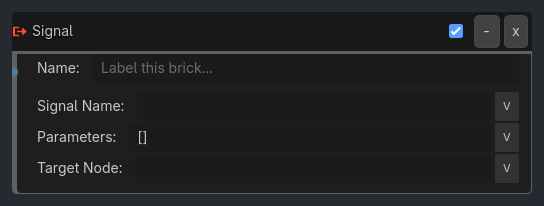
Emits a Godot signal from the owner or an explicit target node, allowing Logic Bricks to trigger external systems, other scripts, or broadcast events to listeners.
## Visual Reference
```{raw} html
```
## Runtime Behavior
**Inputs**
- **Activate** (Pulse): Emits the signal.
**Outputs**
None.
**Properties**
- **Signal Name** (String, "my_signal"): The name of the signal to emit.
- **Target Node** (String, ""): Optional node path/name to emit from. Empty means the brick owner.
- **Parameters** (String / compatibility-only): Reserved field in the UI. Native runtime currently ignores parameters and emits without arguments.
**Execution Behavior**
**Connect Logic**
- No connection needed; emits from the owner node by default.
- If `target_node` is set, the executor resolves that node and emits from it instead.
**Tick Behavior**
- When activated:
- Check if signal exists on target.
- If yes, emit it.
- Missing targets or missing signals fail safely as no-ops.
**State Changes**
None.
**Examples**
**Basic Usage**
- **Signal Name**: `level_completed`
- **Result**: Emits "level_completed" so the Game Manager can React.
**Advanced Usage**
- **Signal Name**: `damage_taken`
- **Parameters**: `[10, "fire"]`
- **Result**: Emits damage event with amount and type.
```{raw} html
```
## Properties
| Property | Type | Default | Notes |
|---|---|---|---|
| Signal | signal_dropdown | | Signal to listen to |
| Target Node | string | | Node that emits the signal (empty = self) |