---
generated_by: gdlink-build
generated_at: 2026-06-23T12:34:28Z
do_not_edit: true
title: Track To
brick_type: executor
tier: Plus
generated: true
---
# Track To
**Category:** Executor
**Tier:** Plus
## Purpose
Makes an object continuously face/track another object.
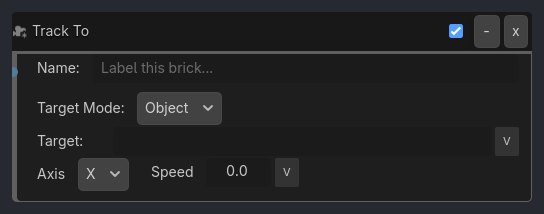
## Visual Reference
```{raw} html
```
## When To Use
**1. Turret Tracking Player**
```
Near Listener (Target: "Player", Distance: 20.0)
-> AND Gate
-> Track To Executor (Target: "Player", Axis: Y, Speed: 3.0, Clamp: true, Min: -60, Max: 60)
```
Turret smoothly tracks player within +/-60 deg range.
**2. Billboard Sprite (Face Camera)**
```
Always Listener
-> AND Gate
-> Track To Executor (Target: "Camera3D", Axis: Z, Speed: 0.0)
```
Sprite always faces camera (instant).
**3. Enemy Eyes Follow Player**
```
Near Listener (Target: "Player", Distance: 5.0)
-> AND Gate
-> Track To Executor (Target: "Player", Axis: Z, Speed: 2.0)
```
Enemy's head (or eyes node) smoothly looks at player.
**4. 2D Spaceship Aim**
```
Mouse Listener (Movement)
-> AND Gate
-> Track To Executor (Target: "MouseCursor", 2D Mode: true, Speed: 5.0)
```
2D spaceship rotates to face mouse cursor.
**5. Security Camera Sweep**
```
Property Listener (Global "alarm_triggered" == true)
-> AND Gate
-> Track To Executor (Target: "AlarmSource", Axis: Y, Speed: 1.0)
```
Camera slowly pans toward alarm source.
## Runtime Behavior
**Executes**: Rotates object to face a target object or world-space point every frame
```{raw} html
Target Position:X0
v
Y0
v
Z0
v
```
## Properties
| Property | Type | Default | Notes |
|---|---|---|---|
| Target Mode | option | Object | Track a named object or a world-space position |
| Target | string | | Object to track/face |
| Target Position | vector3 | [0, 0, 0] | World-space point to track/face |
| Axis | option | Y (Up) | Which axis points at target |
| Speed | float | 0.0 | 0=instant, >0=smooth |