---
generated_by: gdlink-build
generated_at: 2026-06-23T12:34:28Z
do_not_edit: true
title: Visibility
brick_type: executor
tier: Basic
generated: true
---
# Visibility
**Category:** Executor
**Tier:** Basic
## Purpose
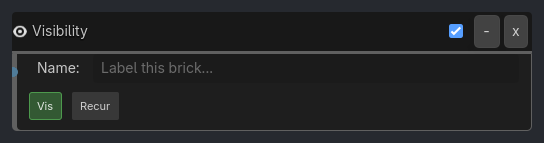
Shows or hides the object (and optionally its children) by toggling visibility.
## Visual Reference
```{raw} html
```
## When To Use
- Hide objects until needed (reveal on trigger)
- Toggle UI elements (show/hide menus)
- Invisibility power-ups
- Hide dead enemies
- Show/hide debug visualizations
- Flickering effects (with Delay listener)
- Cutscene object reveals
## Runtime Behavior
**Executes**: When activated, sets the object's visibility to the specified state
```{raw} html
```
## Properties
| Property | Type | Default | Notes |
|---|---|---|---|
| Vis | bool | True | Show (True) or hide (False) the object |
| Recur | bool | False | If True, also show/hide all child nodes |
## Example Use Cases
**Toggle Object Visibility**:
```
Keyboard(H) -> AND -> Visibility(visible=false)
Keyboard(S) -> AND -> Visibility(visible=true)
// Hide with H key, show with S key
```
**Hide Dead Enemy**:
```
Property(HP, Less or Equal, 0) -> AND -> Visibility(visible=false)
// Hide when health reaches zero
```
**Flickering Light**:
```
Delay(30, repeat=true) -> AND -> Visibility(visible=toggle)
// Toggle visibility every 0.5 seconds (flickering effect)
```
**Reveal Collectible**:
```
Property(quest_complete) -> AND -> Visibility(visible=true, recursive=true)
// Show collectible and all child particles when quest completes
```
**Invisibility Power-Up**:
```
Collision(PowerUp) -> AND -> Visibility(visible=false)
Delay(300) -> AND -> Visibility(visible=true)
// Turn invisible for 5 seconds after collecting power-up
```