Variables
Variables are how a graph remembers and shares values. A listener can read a variable, a gate can branch on it, and an executor can write it — so variables are the connective tissue that lets separate branches of logic talk to each other. Health, score, ammo, the name of the last object you touched: all of it lives in variables.
Local vs global
GDLink has two scopes:
Local variables belong to one node’s graph. Use them for state that only that object cares about — a character’s
speed, an enemy’salert_level. They’re isolated, so two enemies each have their own copy.Global variables are shared across the whole project through the global manager. Use them for things many systems read —
score,coins,current_level, difficulty settings.
Tip
Reach for a local variable first. Promote it to global only when something outside the node genuinely needs to read it — a HUD, a save system, another object. Fewer globals means fewer surprises.
Reading and writing
The Variable executor writes values — set, add, subtract, append to a text buffer, or edit a vector/array element directly. It can even sample live physics data straight into a variable (speed, position) without any glue script. To react to a value, pair it with a Property or Variable listener that pulses when the value crosses a threshold.
Write — a collision adds one to the global score:
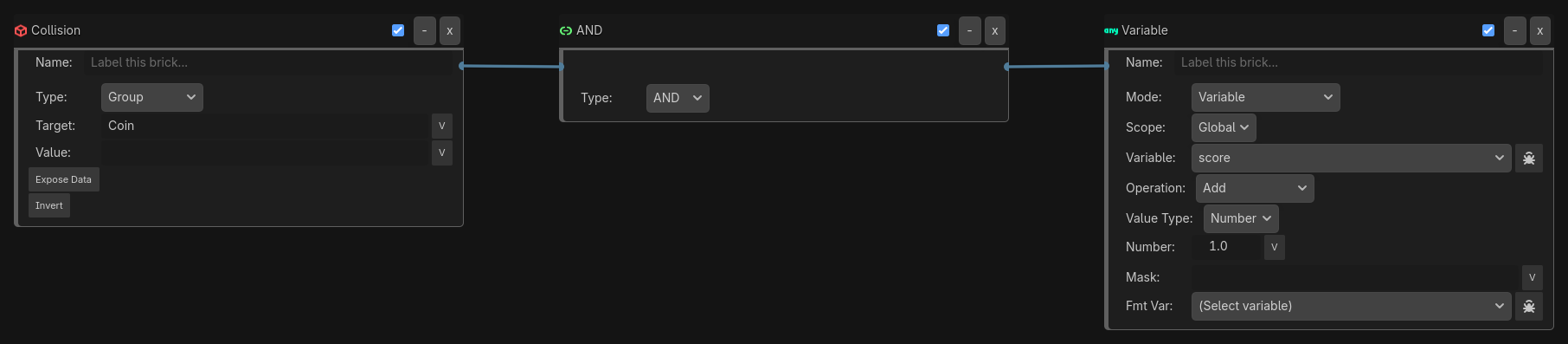
React — a Variable listener pulses when score reaches 100, loading the bonus stage:

Variables also interpolate into text, which is what makes live HUDs trivial:
Label(target=HUD, mode=Set, text="Score: {score} Ammo: {ammo}")
Reserved runtime globals
Some globals are provided by the engine and named with a leading underscore — for example _system_time, which a Label can read directly:
Label(target=Clock, mode=Set, text="{_system_time.hms}")
Note
Reserved globals (names starting with _) are managed by the runtime. Treat them as read-only, and don’t name your own variables with a leading underscore — those names are protected and are skipped by save slots.
Saving and loading
Global variables can be persisted to disk with the Game executor’s save-slot operations (Save / Load / Delete). A slot captures your authored global variables so a player can save progress and resume later; reserved runtime globals are deliberately not written, so loading a slot never clobbers engine state. Local variables are not saved — promote anything that must survive a reload to a global.
Where to go next
States — for modal behavior, where a state layer is often cleaner than a variable flag
Listeners, Gates, Executors — how variables flow through a graph
The Variable executor and Game executor reference pages