Cursor

Category: Executor Tier: Basic

Purpose

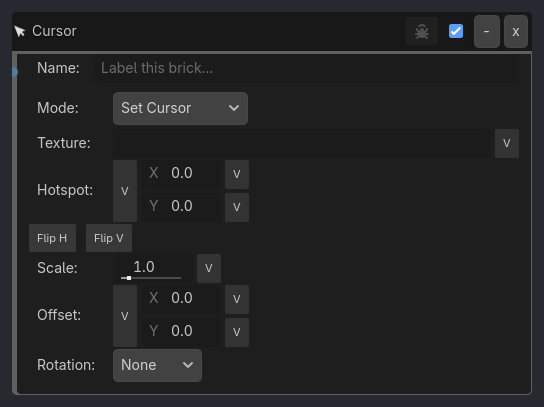
Controls the runtime cursor graphic, visibility, confinement/capture behavior, and simple frame-path cursor animation.

Visual Reference

As added to your scene
Cursor brick as it appears in the GDLink editor

Runtime Behavior

  • Default + visible=true -> Input.MOUSE_MODE_VISIBLE

  • Default + visible=false -> Input.MOUSE_MODE_HIDDEN

  • Screen Locked + visible=true -> Input.MOUSE_MODE_CONFINED

  • Screen Locked + visible=false -> Input.MOUSE_MODE_CONFINED_HIDDEN

  • Center Locked -> Input.MOUSE_MODE_CAPTURED

Generated UI Mockup — showing expanded properties
Cursor
-
x
Name:
Label this brick...
Mode:
Always
Scope:
Local
Prefix:
cursor
v
Move Thresh:
1.0
v
Write X/Y
World 2D
Verbose

Properties

Property

Type

Default

Notes

Mode

option

Always

When cursor position should trigger the listener.

Scope

option

Local

Where cursor variables are written.

Variable

variable_name

cursor_position

Vector2 variable that receives current screen/viewport cursor position.

X Var

variable_name

Variable that receives cursor screen X when components are enabled

Y Var

variable_name

Variable that receives cursor screen Y when components are enabled

World2D Var

variable_name

Variable that receives cursor 2D world position

Prefix

string

cursor

Compatibility fallback when explicit output variables are empty

Move Thresh

float

1.0

[Moved] Minimum cursor delta before this listener fires.

Write X/Y

bool

True

Also write {prefix}_x and {prefix}_y.

World 2D

bool

True

Also write {prefix}_world_2d using the viewport canvas transform.

Verbose

bool

False

Native debug output; controlled by the ladybug header button.