Gravity
Category: Listener Tier: Basic
Purpose
Detects the current gravity state of the object, enabling logic to react to changes in gravity such as zero-G animations, wall-walking controls, or gravity well effects.
Visual Reference
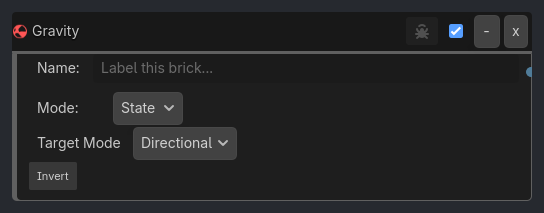
When To Use
Zero-G Animation:
Listener:
Gravity(Mode: Value, Property: Strength, Compare: Equal, Value: 0).Gate: AND.
Executor: Animation (Float).
Wall Walking Camera:
Listener:
Gravity(Mode: Value, Property: Direction Y, Compare: Greater, Value: 0.1) -> means Gravity is UP.Executor: Camera (Rotate 180).
Properties
Property |
Type |
Default |
Notes |
|---|---|---|---|
mode |
option, “State” |
Check gravity status (State) or gravity numbers (Value) |
|
property |
option, “Active” |
Which property to check - Active, Mode, Strength, Direction X, Direction Y, or Direction Z |
|
target_state |
option, “Directional” |
[State Mode] Gravity mode to match - Directional, Point, Zero, or Restore |
|
comparison |
option, “Equal” |
[Value Mode] Comparison operator - Equal, Not Equal, Greater, Less, Greater or Equal, Less or Equal |
|
value |
float, 0.0 |
[Value Mode] Threshold value to compare against |
|
invert |
bool, false |
Invert the gravity condition |
|
verbose |
bool, false |
Hidden ladybug debug output flag |