GDScript
Category: Gate Tier: Pro
Purpose
Executes custom GDScript code to make complex decisions that can’t be easily expressed with logic gates or expressions.
Visual Reference
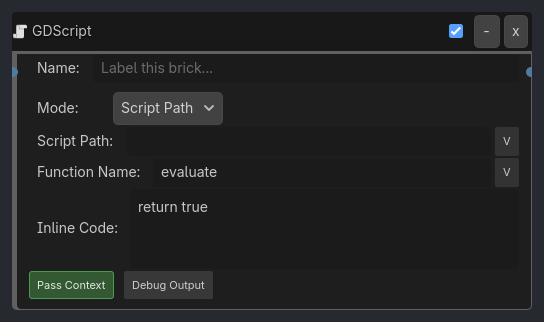
When To Use
1. Complex AI State Machine
Always Listener
-> GDScript Gate (Script: "ai_brain.gd", Function: "decide_action")
-> Animation Executor (Play: animation from Local Variable "ai_action")
AI brain script returns TRUE and sets “ai_action” variable, which drives animation.
2. Custom Scoring System
Collision Listener (Group: "targets")
-> GDScript Gate (Inline: "return calculate_score > 100")
-> PRINT Executor ("Victory!")
Custom scoring logic too complex for Expression Gate.
3. Pathfinding Decision
Near Listener (Distance: 20.0, Expose Data: true)
-> GDScript Gate (Script: "pathfinding.gd", Function: "has_clear_path")
-> Motion Executor (Move toward target)
Checks if path to target is clear using A* or NavMesh.
4. Procedural Animation Blending
Keyboard Listener (Any key)
-> GDScript Gate (Script: "animation_blend.gd")
-> Animation Executor (Controlled by script)
Script calculates animation blend weights based on movement speed, direction, etc.
5. Inventory Logic
Keyboard Listener (Key: "E")
-> Near Listener (Group: "items")
-> GDScript Gate (Script: "inventory.gd", Function: "can_pickup")
-> Property Executor (Add to inventory)
Script checks inventory space, item type, player level, etc.
Properties
Property |
Type |
Default |
Notes |
|---|---|---|---|
mode |
String, “Script Path” |
Script Path (load external.gd file) or Inline Code (write code directly) |
|
script_path |
String, “” |
Path to.gd file (e.g., res://scripts/ai_logic.gd) |
|
function_name |
String, “evaluate” |
Function to call - must return bool |
|
inline_code |
Text, “return true” |
GDScript code to execute (must return bool) |
|
pass_context |
Boolean, true |
Pass brick context (listeners, globals, locals) to function |
|
debug_output |
Boolean, false |
Print function return value to console |