Window
Category: Executor Tier: Basic
Purpose
Controls the application window state, including fullscreen mode, resolution, and border visibility.
Visual Reference
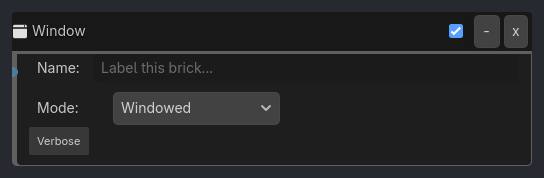
Runtime Behavior
Inputs
Activate (Pulse): Applies the window settings.
Outputs None.
Properties
Mode (String, “Windowed”): “Windowed”, “Fullscreen”, “Exclusive Fullscreen”, “Maximized”, “Minimized”.
Resolution (Vector2, (1920, 1080)): Target resolution (pixels). Valid only in Windowed/Fullscreen modes (depending on OS).
Borderless (Bool, false): Remove window borders (for “Borderless Windowed” feel).
V-Sync (Bool, true): Enable Vertical Sync (Maps to
DisplayServer.VSYNC_ENABLED/DISABLED).
Execution Behavior
Connect Logic
None.
Tick Behavior
When activated:
Mode: Maps string to
DisplayServer.WINDOW_MODE_*.“Windowed” ->
WINDOW_MODE_WINDOWED“Fullscreen” ->
WINDOW_MODE_FULLSCREEN(Note: Godot 4 treats this as “Borderless Fullscreen” usually, “Exclusive” is separate).“Exclusive Fullscreen” ->
WINDOW_MODE_EXCLUSIVE_FULLSCREENResolution: Calls
DisplayServer.window_set_size(size).Centering Logic: When switching to “Windowed”, calculate center:
screen_pos + (screen_size / 2) - (window_size / 2). UseDisplayServer.screen_get_positionandscreen_get_size. Essential to prevent top-left jumping.Borderless: Calls
DisplayServer.window_set_flag(DisplayServer.WINDOW_FLAG_BORDERLESS, value).V-Sync: Maps boolean to Enum.
true->DisplayServer.window_set_vsync_mode(DisplayServer.VSYNC_ENABLED)false->DisplayServer.window_set_vsync_mode(DisplayServer.VSYNC_DISABLED)
State Changes None.
Examples
Basic Usage
Mode: “Fullscreen”
…
Properties
This brick does not expose a generated property table yet. See the source specification for implementation notes.