Keyboard
Category: Listener Tier: Basic
Purpose
Detects keyboard input with trigger modes, pulse detection, modifier key requirements, and inversion.
Visual Reference
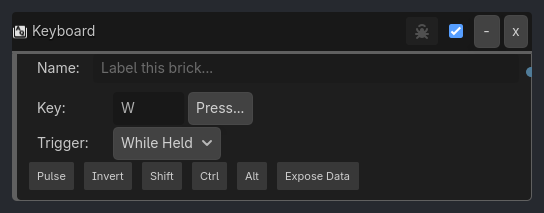
When To Use
Player movement (WASD keys, trigger_mode=While Held)
Jump mechanics (Space with trigger_mode=On Press)
Menu hotkeys (F1 for inventory, Escape for pause)
Debug commands (Ctrl+D for debug overlay)
Alternative controls (invert=true for “do X when key NOT pressed”)
Runtime Behavior
Triggers: When the specified key is pressed/held/released, with optional modifier key requirements
Properties
Property |
Type |
Default |
Notes |
|---|---|---|---|
key |
option, “W” |
Which keyboard key to detect (W, A, S, D, Space, Arrows, F1-F12, etc.) |
|
trigger_mode |
option, “While Held” |
When to trigger: “While Held”, “On Press”, “On Release” |
|
pulse |
bool, false |
Use pulse detection (True) or physical key detection (False) |
|
invert |
bool, false |
Trigger when key is NOT pressed |
|
require_shift |
bool, false |
Only trigger if Shift key is held |
|
require_ctrl |
bool, false |
Only trigger if Ctrl key is held |
|
require_alt |
bool, false |
Only trigger if Alt key is held |
|
expose_keyboard_data |
bool, false |
Write key name, pressed state, and modifier info into variables when the listener fires. |
|
expose_scope |
option, Local |
Write exposed values to Local or Global variables (visible when expose_keyboard_data=true). |
|
expose_prefix |
string, keyboard |
Prefix used for exposed variable names (visible when expose_keyboard_data=true). |
Example Use Cases
Basic Movement:
Keyboard(key=W, trigger_mode=While Held) -> AND -> Motion(forward)
Keyboard(key=S, trigger_mode=While Held) -> AND -> Motion(backward)
Jump (On Press):
Keyboard(key=Space, trigger_mode=On Press) -> AND -> Motion(jump)
// Only triggers once per press, must release and press again
Debug Command (Modifier Key):
Keyboard(key=D, require_ctrl=true) -> AND -> Visibility(show debug UI)
// Only triggers when Ctrl+D pressed together
Crouch While NOT Holding Key:
Keyboard(key=Shift, invert=true) -> AND -> Animation(crouch)
// Crouches when Shift is NOT held