SpringArm3D
Category: Executor Tier: Plus
Purpose
The SpringArm3D Executor provides a native interface to control a SpringArm3D node’s collision behavior and length.
Visual Reference
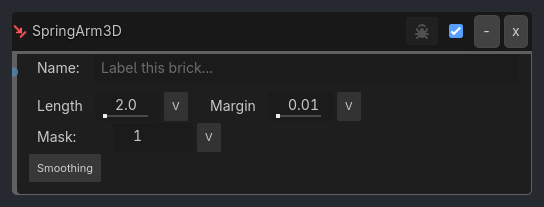
Runtime Behavior
Inputs
Activate (Boolean): When true, the executor updates properties and handles movement smoothing.
Target Length (Float): A dynamic input to drive
spring_lengthvia variable binding.
Outputs None
Properties
Core Configuration
Spring Length (Float, 2.0): The maximum distance the arm extends if no collision is hit.
Margin (Float, 0.01): The offset from the collision point to prevent the camera from clipping inside geometry.
Collision Mask (Integer Bitmask): Defines which physics layers the arm should collide with.
Smoothing And Catch-Up Logic
Enable Smoothing (Boolean, false): When true, the arm follows its tree parent using the authored local transform as the target.
Smoothing Mode (Option:
Location,Rotation,Both; defaultLocation): Chooses which channels interpolate while detached. Channels not selected by the mode snap directly to the authored follow target each tick.Rotation Follow Mode (Option:
Absolute,Additive; defaultAbsolute): When rotation smoothing is active,Absolutelets the executor fully own the arm’s rotation, whileAdditivepreserves extra local camera-look rotation applied to the sameSpringArm3Dand composes it on top of the parent-follow pose.Smoothing Speed (Float, 5.0): How quickly the arm catches up to the parent.
Auto Top-Level (Boolean, true): If enabled, the executor automatically enables Top Level at runtime so the arm can move independently.
Debug And UX (v0.8.98.1-dev11)
…
Properties
This brick does not expose a generated property table yet. See the source specification for implementation notes.