Motion3D
Category: Executor Tier: Plus
Purpose
The Motion3D executor provides 3D-specific motion and physics for Node3D-based objects.
Visual Reference
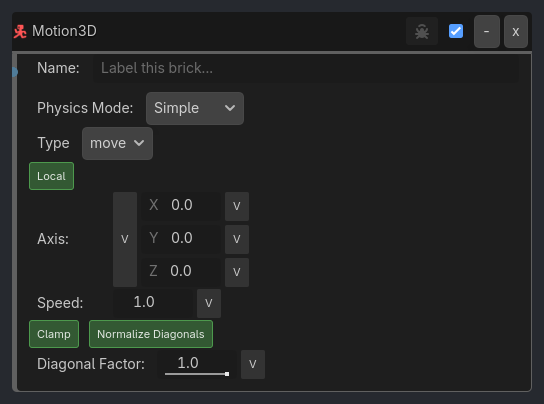
Runtime Behavior
Inputs
Activate (Boolean): When true, applies motion/physics; when false, stops motion
Outputs None
Properties
Core Properties
Physics Mode (Enum, “Simple”): Physics system to use
Simple: Direct transform manipulation (no physics engine)
Force: Apply forces to RigidBody3D
Velocity: Set velocity on RigidBody3D
Character: CharacterBody3D with move_and_slide
Type (Enum, “move”): Motion type
move: Translate position using X, Y, and Z axes
rotate: Rotate around specified axis (degrees/sec)
Vector (Dir/Axis) (Vector3, Vector3.ZERO): Direction for movement or rotation axis
move mode: X = right, Y = up, Z = forward/back
rotate mode: Axis to rotate around (normalized)
Speed (Float, 1.0): Movement speed (units/sec) or rotation speed (deg/sec)
Range: -10000.0 to 10000.0
Local Space (Boolean, true): Apply motion relative to object’s rotation (true) or world space (false)
Clamp Input (Boolean, true): Clamp vector X/Y/Z to -1 to 1 range
true: Input treated as direction only, speed controls magnitude
false: Allow values outside -1 to 1 range
Matches industry-standard input conventions (gamepad axes are -1 to 1)
Recommended: Keep enabled for consistent behavior
Add Movement (Boolean, false): Add to existing velocity (true) or replace it (false)
Only applies to CharacterBody3D mode
RigidBody3D Properties (Force/Velocity Modes)
Force (Vector3, Vector3.ZERO): Force to apply to RigidBody3D
Applied in addition to movement vector
…
Properties
This brick does not expose a generated property table yet. See the source specification for implementation notes.