Sound
Category: Executor Tier: Basic
Purpose
Plays, stops, and controls audio including sound effects, music, UI feedback, and 3D positional audio.
Visual Reference
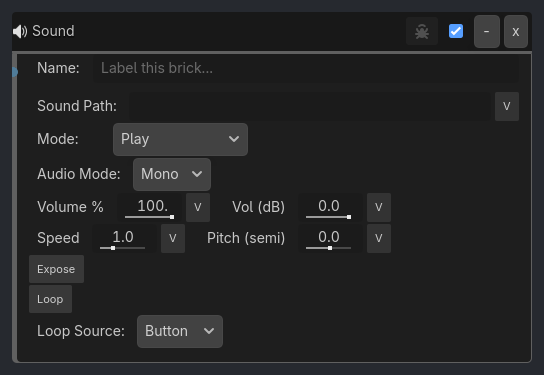
When To Use
Weapon sounds (gunshots, sword swings)
Footstep sounds (walking, running)
Background music (ambient, combat, menu)
UI sounds (button clicks, menu navigation)
Environmental sounds (wind, water, fire)
Voice lines (dialogue, alerts)
Collision sounds (impacts, explosions)
Victory/defeat music
Runtime Behavior
Executes: When activated, performs audio playback operations
Runtime Notes
Playis idempotent for an already active matching stream on the same host. A continuous trigger can keep driving live parameter updates without restarting the sound every tick.Bound
volume_percent,volume_db,speed,pitch_semitones,stereo_pan,max_distance, andattenuationare refreshed every native tick for the currently owned playing sound, even after the initialPlaypulse has passed.mode,loop,sound_path, and spatial-mode/player-class changes still apply on explicit execution, not as passive every-tick rewrites.Seek Tomoves the current owned player toseek_seconds;Seek ForwardandSeek Backwardoffset the current playback position byseek_seconds. These modes operate on the cached player created byPlay.When
expose_playback=true, the executor publishes current playback position, loaded stream duration, normalized percent, and playing state for UI sliders, timers, playlist controls, and audio-driven interactions. New scenes should map each output to an explicit variable;expose_prefixremains as a saved-scene compatibility fallback.
…
Properties
Property |
Type |
Default |
Notes |
|---|---|---|---|
sound_path |
String, “” |
Path to audio file (e.g. res://sounds/beep.wav), a metadata key like _demo_beep_sound that resolves to either a String path or an AudioStream, or a procedural tone URI like tone:440 |
|
mode |
String, “Play” |
Audio playback operation - Play, Stop, Pause, Resume, Seek To, Seek Forward, or Seek Backward |
|
audio_mode |
String, “Mono” |
Playback space - Mono, Stereo, or Spatial. Stereo uses a panner bus for true left/right balance without distance attenuation. Spatial uses 2D/3D falloff when the host supports it. |
|
volume_percent |
Float, 100.0 |
Master volume slider (0-100). 0 = mute, 100 = full. Combined with volume_db trim. |
|
volume_db |
Float, 0.0 |
Fine-tune trim in decibels (-80.0 to +6.0). Added on top of volume_percent. 0 dB = no change. |
|
speed |
Float, 1.0 |
Playback rate (0.01-4.0). 1.0 = normal, 0.5 = half speed, 2.0 = double. |
|
pitch_semitones |
Float, 0.0 |
Transpose in semitones (-24 to +24). +12 = octave up, -12 = octave down. Applied through a GDLink-managed pitch-shift bus so speed remains playback rate. |
|
seek_seconds |
Float, 5.0 |
Seconds used by Seek To, Seek Forward, and Seek Backward. |
|
expose_playback |
Boolean, false |
Writes playback position, duration, percent, and playing state into variables. |
|
expose_scope |
Local or Global |
Where playback readback variables are written. |
|
expose_position_var |
Variant |
, expose_duration_var, expose_percent_var, expose_playing_var (String): Explicit destination variables for playback readback outputs. |
|
expose_prefix |
String, “sound” |
Compatibility fallback for {prefix}_position, {prefix}_duration, {prefix}_percent, and {prefix}_playing when explicit output variables are empty. |
|
loop |
Boolean, false |
Loop sound indefinitely |
|
loop_source |
Button or Variable |
Button uses the Loop toggle; Variable reads Bool/Int loop state at runtime. |
|
loop_variable |
String |
Bool or Int variable used when loop_source=Variable (0=false, nonzero=true). |
|
use_3d_sound |
Boolean, false |
Legacy compatibility flag. New scenes should use audio_mode=Spatial. |
|
stereo_pan |
Float, 0.0 |
[Stereo] Left/right pan range from -1.0 to 1.0. Runtime routes through AudioEffectPanner: -1 = left, 0 = center, 1 = right. |
|
max_distance |
Float, 100.0 |
[Spatial Sound] Maximum hearing distance (1.0-1000.0) |
|
attenuation |
Float, 1.0 |
[Spatial Sound] How quickly sound fades with distance (0.1-10.0) |
|
verbose |
Boolean, false |
Hidden debug flag driven by the ladybug toggle. Logs the actual player class, path, volume, pitch, audio mode, pan, and spatial settings after execution. |
Example Use Cases
Gunshot Sound:
Mouse(Left Button, tap=true) -> AND -> Sound(sound=gunshot.wav, mode=Play, volume=-5.0)
// Play gunshot at slightly reduced volume
Footstep Sounds:
Sample inspector layout removed for compatibility.
Background Music:
Always -> AND -> Sound(sound=ambient_music.ogg, mode=Play, loop=true, volume=-10.0)
// Play looping ambient music at background volume
Spatial Sound:
Collision(Player) -> AND -> Sound(sound=alarm.wav, mode=Play, 3d=true, max_distance=50.0)
// Play alarm with positional falloff. Uses AudioStreamPlayer3D on Node3D hosts and AudioStreamPlayer2D on Node2D hosts.
UI Button Sound:
Signal(button_pressed) -> AND -> Sound(sound=ui_click.wav, mode=Play, volume_percent=75)
// On Control hosts, plays a mono AudioStreamPlayer suitable for UI feedback. 75% master, no dB trim.
Stereo Pan:
Variable(menu_pan, Not Equal, 0) -> AND -> Sound(sound=hover.wav, audio_mode=Stereo, stereo_pan=menu_pan)
// Pans non-spatial audio left/right without positional distance attenuation.
Victory Music:
Sample inspector layout removed for compatibility.
Variable Speed + Pitch:
Variable(rpm, Less, 1500) -> AND -> Sound(sound=engine.wav, speed=0.8, pitch_semitones=0)
Variable(rpm, Greater, 3000) -> AND -> Sound(sound=engine.wav, speed=1.5, pitch_semitones=7)
// Slow engine plays at 0.8x rate. Revved engine plays at 1.5x rate transposed up a fifth.
// Speed = playback rate; pitch_semitones = musical transpose without changing playback rate.
Array Playlist + Seek Readback:
...