Touch
Category: Listener Tier: Basic
Purpose
Detects touch input on mobile devices and touchscreens.
Visual Reference
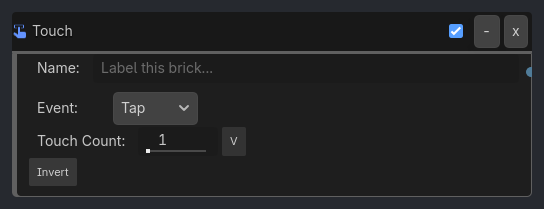
As added to your scene
When To Use
1. Mobile Jump
Touch Listener (Event: Tap, Area: Anywhere)
-> AND Gate
-> Motion Executor (Character Jump)
Tap anywhere to jump.
2. Virtual Joystick
Touch Listener (Event: Press, Region: (50, 450, 100, 100))
-> AND Gate
-> Property Executor (Set Local "joystick_active" = true)

Touch Listener (Event: Release)
-> AND Gate
-> Property Executor (Set Local "joystick_active" = false)
Detect touch in joystick area.
3. Swipe to Attack
Touch Listener (Event: Swipe, Direction: Right, Min Distance: 100)
-> AND Gate
-> Animation Executor (Play: "sword_slash")
Swipe right to attack.
4. Pinch to Zoom
Touch Listener (Event: Pinch, Touch Count: 2, Expose Data: true)
-> Expression Gate (check pinch_delta)
-> Camera Executor (FOV: fov + pinch_delta * 0.1)
Two-finger pinch to zoom camera.
5. Long Press Context Menu
Touch Listener (Event: Long Press, Duration: 0.5, Expose Data: true)
-> AND Gate
-> Scene Executor (Load: "res://ui/context_menu.tscn")
Hold for 0.5s to open context menu at touch position.
Runtime Behavior
Evaluates: TRUE when specified touch event occurs
Generated UI Mockup — showing expanded properties
Touch
-
x
Name:
Label this brick...
Invert
v
v
Properties
Property |
Type |
Default |
Notes |
|---|---|---|---|
event_type |
option, “Tap” |
Touch event type - Tap, Press, Release, Swipe, or Pinch |
|
touch_count |
int, 1 |
Number of fingers required |