Ray
Category: Listener Tier: Basic
Purpose
Casts a ray from the object in a specified direction and triggers when the ray hits something, with optional filtering.
Visual Reference
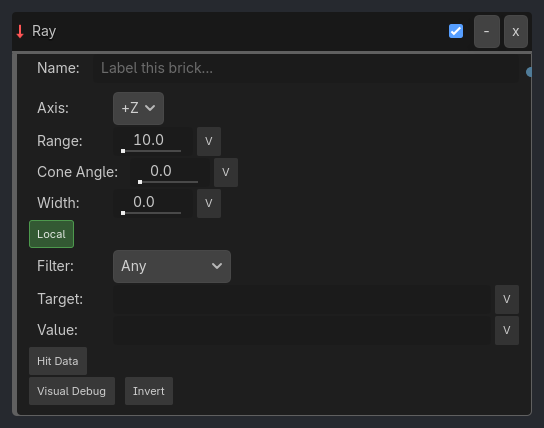
When To Use
Ground detection (raycast down to check if on floor)
Line of sight (AI checks if player is visible)
Wall detection (raycast forward to avoid obstacles)
Targeting systems (check if crosshair points at enemy)
Hover effects (raycast to detect surface below vehicle)
Projectile preview (show where bullet will land)
Runtime Behavior
Triggers: When raycast hits an object matching the filter criteria within range
Properties
Property |
Type |
Default |
Notes |
|---|---|---|---|
axis |
String, “+Z” |
Ray direction - +X, -X, +Y, -Y, +Z, or -Z |
|
range |
Float, 10.0 |
Maximum raycast distance (0.1-1000.0) |
|
cone_angle |
Float, 0.0 |
If > 0, performs a cone/triangular scan instead of narrow ray (0.0-180.0) |
|
ray_width |
Float, 0.0 |
Breadth of the ray using shape casting (0.0-50.0) |
|
use_local_space |
Boolean, true |
Cast ray relative to object rotation (true) or world axes (false) |
|
target_type |
String, “Any” |
Filter type for raycast hits - Any, Object Name, Group, or Property |
|
target_name |
String, “” |
Name/Group/Property to match |
|
property_value |
String, “” |
Expected property value for Property filter |
|
expose_hit_data |
Boolean, false |
Store hit point/normal/distance in Local Variables |
|
expose_scope |
String, “Local” |
Where exposed hit data is written - Local or Global |
|
expose_prefix |
String, “ray” |
Prefix used for exposed variables, such as ray_target_point |
|
visual_debug |
Boolean, false |
Draw the ray in the editor/game for debugging |
Example Use Cases
Ground Detection:
Ray(axis=-Y, range=0.2, target=Any) -> AND -> Property(is_grounded, Set, true)
// Check if ground is within 0.2 units below
AI Line of Sight:
Ray(axis=+Z, range=20, target=Object Name, name=Player) -> AND -> Property(can_see_player, Set, true)
// Detect if player is in front within 20 units
Wall Avoidance:
Ray(axis=+X, range=2.0, target=Group, name=Obstacles) -> AND -> Rotation(turn)
// Turn when wall detected within 2 units ahead
Hover Vehicle:
Ray(axis=-Y, range=5.0, expose_hit_data=true) -> AND -> Math(hover_height, Set, ray_distance)
// Measure distance to ground for hover control