Math
Category: Executor Tier: Basic
Purpose
Performs native math against Local or Global variables.
Visual Reference
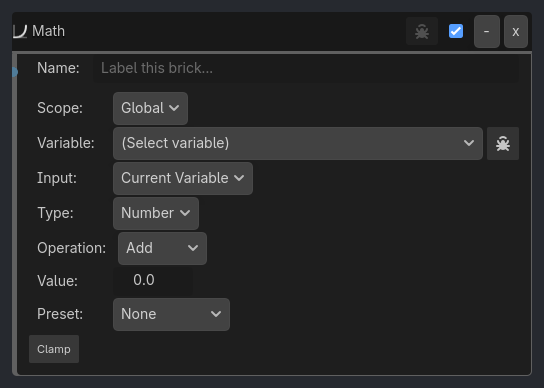
Properties
Property |
Type |
Default |
Notes |
|---|---|---|---|
scope |
Global | Local |
where the destination variable lives |
|
variable |
Variant |
destination variable to write |
|
input_mode |
Current Variable | Source Variable |
use the destination as the operand, or read from a separate source variable first |
|
source_scope |
Global | Local |
source variable scope when input_mode = Source Variable |
|
source_variable |
Variant |
source variable read before the operation |
|
type |
Number | Vector2 | Vector3 | Array |
authored value shape shown in the inspector |
|
verbose |
Variant |
throttled native proof logging |
|
operation |
Variant |
Add, Subtract, Multiply, Divide, Modulo, Set, Clamp, Sin, Cos, Tan, Sqrt, Abs, Floor, Ceil, Round |
|
value |
Variant |
numeric operand |
|
conversion_preset |
Variant |
None, M/S to KM/H, M/S to MPH |
|
use_clamp |
Variant |
, min_value, max_value: local brick clamp request; if the variable already has schema min/max, those limits still apply to the final write |
|
operation_vec |
Variant |
Set, Add, Subtract, Multiply, Scale, Normalize, Abs, Floor, Ceil, Round |
|
vec2_value |
Variant |
/ vec3_value: vector operand for matching mode |
|
scale_value |
Variant |
scalar multiplier used by Scale |
|
operation_array |
Variant |
Length, Get At, Set At, Sum, Average, Min, Max |
|
array_index |
Variant |
index used by Get At / Set At |
|
array_set_value_type |
Variant |
literal type written by Set At: Integer, Float, Boolean, String, Vector2, Vector3, Color, or Array |
|
array_int_value |
Variant |
, array_numeric_value, array_bool_value, array_text_value, array_vector2_value, array_vector3_value, array_color_value, array_literal_value: typed literal fields shown for the selected array_set_value_type |
|
Playlist / rotating audio |
Variant |
Store sound paths in an Array variable such as playlist = [“res://music/menu.ogg”, “res://music/battle.ogg”]. Keep a Number variable like selected_track, then use Math Get At with array_index bound to selected_track to write the selected path into a current_track variable. A Sound Executor can read current_track, so UI buttons only need to change the index. |
|
Dialogue / tutorial pages |
Variant |
Store lines in an Array variable such as dialogue_lines = [“Move with WASD”, “Collect the key”, “Open the door”]. Use Math Get At to copy the current line into a Label Typewrite variable, then use Math Length to know when the selected index has reached the end. |
|
Score, ammo, or inventory totals |
Variant |
Store numeric counts in an Array variable such as slot_counts = [3, 1, 0, 5]. Use Sum for a total count, Max for the fullest slot, or Min to find the lowest numeric value while ignoring text labels or empty marker strings. |
|
Slot edits without rebuilding the Array |
Variant |
Use Set At when one UI slot changes. For example, changing slot 2 from “empty” to “potion” updates that element in place, which is easier to author than replacing the whole Array literal. |
Notes
Destination variables are created automatically when missing
Division by zero is a safe no-op
Clampuses brick min/max values, then the final write still respects variable-schema constraints if they existSource-variable mode works for Number, Vector2/Vector3, and Array
Array
Set Atcan write integers, floats, booleans, strings/resource paths, vectors, and nested arrays without coercing everything to float.