Mouse
Category: Listener Tier: Basic
Purpose
Detects mouse buttons, movement, wheel, and hover events.
Visual Reference
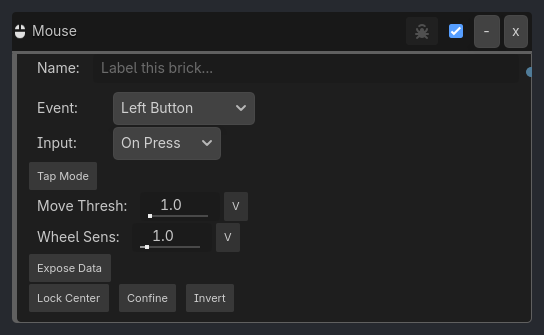
When To Use
Follow-mouse and strafe-style 2D control graphs.
Capture mouse position into variables for indirect targeting.
Read wheel and delta values into gameplay logic without custom code.
Feed
{prefix}_world_2dor{prefix}_positiondirectly intoServoor intoTrack Toposition-variable mode for top-down/tower-style targeting.
Runtime Behavior
Triggers: Based on the selected mouse event and input mode.
Buttons support
While Held,On Press, andOn Release.Movement and wheel events use the runtime
mouse_statecache.Hover supports both
Mouse OverandMouse Over Any.invert=trueflips the final active state like other listeners.
Properties
Property |
Type |
Default |
Notes |
|---|---|---|---|
mouse_event |
option, Left Button |
Event to detect. |
|
input_mode |
option, On Press |
Button trigger mode. |
|
tap_mode |
bool, false |
Legacy compatibility flag. |
|
movement_threshold |
float, 1.0 |
Minimum movement delta for movement events. |
|
wheel_sensitivity |
float, 1.0 |
Sensitivity multiplier for wheel events. |
|
expose_mouse_data |
bool, false |
Write sampled mouse data into runtime variables. |
|
expose_scope |
option, Local |
Write exposed values to Local or Global. |
|
expose_prefix |
string, mouse |
Prefix used for exposed variable names. |
|
lock_to_center |
bool, false |
Captures the cursor for FPS-style control. |
|
keep_in_screen |
bool, false |
Confines the cursor inside the window. |
Notes
Native implementation:
src/listeners/mouse_listener.cppgdlink_runtime.gdmaintainsmouse_statewith:mouse_positionmouse_position_world_2dmouse_deltawheel_deltamouse_positionandmouse_position_world_2dare refreshed every runtime tick, not only on mouse motion, so Camera2D zoom/offset and viewport changes remain reflected in exposed variables.Exposed values are sampled every tick when
expose_mouse_data=true, even if the selected mouse event is not currently firing. Event firing still controls whether the listener output passes to gates.