XR Passthrough
Category: Executor Tier: Pro
Purpose
Controls Mixed Reality (MR) passthrough features — camera feed overlay, alpha blending, and edge enhancement.
Visual Reference
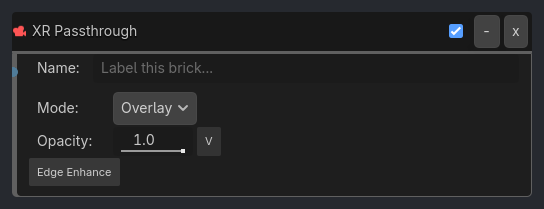
Runtime Behavior
Inputs
Activate (Boolean): Toggles passthrough on/off.
Properties
Core (always visible)
passthrough_mode (Enum, default
"Overlay"):Overlay,Alpha,Composition Layer(future)
Overlay Mode
opacity (Float, default
1.0): Passthrough feed opacity (0.0-1.0).edge_enhancement (Bool, default
false): Apply edge detection filter to camera feed.
Alpha Mode
opacity (Float, default
0.5): Blend factor between virtual scene and camera feed.
Composition Layer Mode (future, visible_if: {passthrough_mode: "Composition Layer"})
layer_type (Enum):
Quad,Cylinder,Equirectviewport_path (NodePath): SubViewport to render on the composition layer.
sort_order (Int, default
0): Layer rendering priority.
Properties
This brick does not expose a generated property table yet. See the source specification for implementation notes.