XR Avatar
Category: Executor Tier: Pro
Purpose
Drives skeletal and blend-shape data from XR trackers onto visual meshes.
Visual Reference
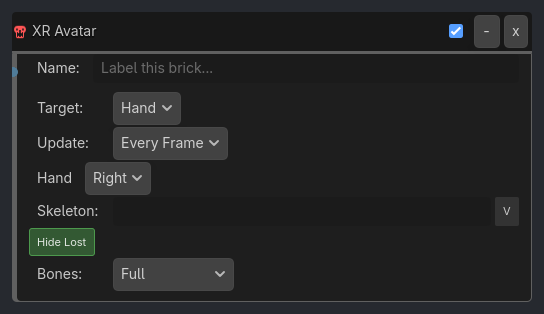
Runtime Behavior
Inputs
Activate (Boolean): When true, continuously drive the target skeleton/mesh from tracker data each tick.
Properties
Core (always visible)
avatar_target (Enum, default
"Hand"):Hand,Body,Faceupdate_frequency (Enum, default
"Every Frame"):Every Frame,Physics Tick
Hand Mode (visible_if: {avatar_target: "Hand"})
tracker_hand (Enum):
Left,Righttarget_skeleton (NodePath): Path to Skeleton3D node.
hide_when_lost (Bool, default
true): Hide hand mesh when tracking is lost.bone_update (Enum, default
"Full"):Full(position + rotation),Rotation Only
Body Mode (visible_if: {avatar_target: "Body"})
tracker_name (String, default
"PrimaryBody"): XRBodyTracker name.target_skeleton (NodePath): Path to Skeleton3D node.
selective_tracking (Flags, default
Full):Full,Upper Body,Lower Body,Hands Onlybone_update (Enum, default
"Full"):Full,Rotation Only
Face Mode (visible_if: {avatar_target: "Face"})
face_tracker (String, default
"PrimaryFace"): XRFaceTracker name.target_mesh (NodePath): Path to MeshInstance3D with blend shapes.
face_mapping (Enum, default
"Auto-Map"):Auto-Map(match blend shape names),Manual(explicit mapping table)
Properties
This brick does not expose a generated property table yet. See the source specification for implementation notes.