Animation
Category: Executor Tier: Basic
Purpose
Controls AnimationPlayer and AnimatedSprite2D animations including play, pause, stop, and blending.
Visual Reference
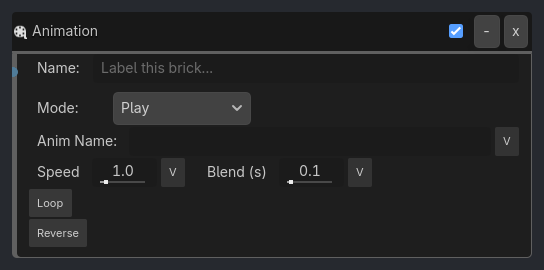
When To Use
Character animations (idle, walk, run, jump, attack)
Mechanical objects (doors, gears, elevators)
UI animations (menu transitions, button presses)
Cutscene animations
Enemy attack animations
Environmental animations (water, fire, plants)
Runtime Behavior
Executes: When activated, performs animation control operations
Properties
Property |
Type |
Default |
Notes |
|---|---|---|---|
animation_name |
String, “” |
Name of animation to play (e.g. ‘walk’, ‘idle’, ‘jump’) |
|
mode |
String, “Play” |
Animation control operation - Play, Stop, Pause, Resume, or Play Backwards |
|
speed |
Float, 1.0 |
Playback speed multiplier (0.5 = half speed, 2.0 = double speed, range 0.0-10.0) |
|
blend_time |
Float, 0.1 |
Transition blend duration in seconds (0.0-2.0) |
|
loop |
Boolean, false |
Loop animation indefinitely |
|
loop_mode |
String, “Normal” |
Normal (loop from start) or Ping-Pong (play forward then backward) |
|
from_end |
Boolean, false |
Start playing from the end (for reverse animations) |
Example Use Cases
Character State Animations:
Property(state, Equal, idle) -> AND -> Animation(name=idle, mode=Play, loop=true)
Property(state, Equal, walk) -> AND -> Animation(name=walk, mode=Play, loop=true, blend=0.2)
Property(state, Equal, run) -> AND -> Animation(name=run, mode=Play, loop=true, blend=0.2)
Property(state, Equal, jump) -> AND -> Animation(name=jump, mode=Play, loop=false)
Door Opening:
Collision(Player) -> AND -> Animation(name=door_open, mode=Play, speed=1.0)
Delay(180) -> AND -> Animation(name=door_open, mode=Play Backwards)
// Open door, wait 3 seconds, close door
Attack Animation:
Sample inspector layout removed for compatibility.
Speed Control:
Property(stamina, Greater, 50) -> AND -> Animation(name=run, speed=1.5)
Property(stamina, Less, 50) -> AND -> Animation(name=run, speed=0.8)
// Faster animation when high stamina, slower when tired