Scene
Category: Executor Tier: Basic
Purpose
Controls scene loading, transitions, and game flow including level changes, menu navigation, and scene overlays.
Visual Reference
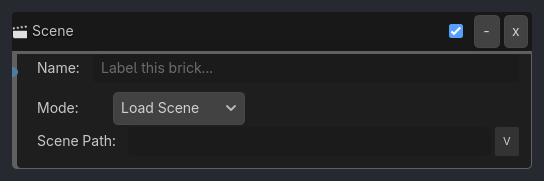
When To Use
Level transitions (complete level -> load next)
Menu navigation (main menu -> settings -> game)
UI button navigation (Control host + UI Click listener)
Game over / restart (reload current scene)
Pause menus (add overlay scene)
Victory screens (load ending scene)
Quit buttons (exit game)
Loading screens (scene transitions)
Runtime Behavior
Executes: When activated, performs scene management operations
Properties
Property |
Type |
Default |
Notes |
|---|---|---|---|
mode |
String, “Load Scene” |
Scene operation to perform - Load Scene, Reload Current, or Quit Game |
|
scene_path |
String, “” |
Path to scene file (e.g. res://scenes/level2.tscn). Leave empty for Reload Current or Quit Game |
Example Use Cases
Load Next Level:
Collision(LevelExit) -> AND -> Scene(mode=Load Scene, path="res://levels/level2.tscn", transition=Fade)
// Change to next level with fade transition
Restart on Death:
Property(HP, Less or Equal, 0) -> AND -> Scene(mode=Reload Current, transition=Fade, duration=1.0)
// Reload current level when player dies
Pause Menu:
Keyboard(Escape) -> AND -> Scene(mode=Add Scene, path="res://ui/pause_menu.tscn")
// Add pause menu as overlay
Quit Game:
Keyboard(Q) -> AND -> Scene(mode=Quit Game)
// Exit application (in pause menu or game over screen)
Menu Navigation:
// Main menu buttons on Control hosts
UI Click(Left, Pressed) -> AND -> Scene(mode=Load Scene, path="res://scenes/game.tscn")
UI Click(Left, Pressed) -> AND -> Scene(mode=Load Scene, path="res://scenes/settings.tscn")
UI Click(Left, Pressed) -> AND -> Scene(mode=Quit Game)
Restart Button:
UI Click(Left, Pressed) -> AND -> Scene(mode=Reload Current)