Near
Category: Listener Tier: Basic
Purpose
Detects when objects enter or exit a spherical (3D) or circular (2D) radius around the listener’s parent object.
Visual Reference
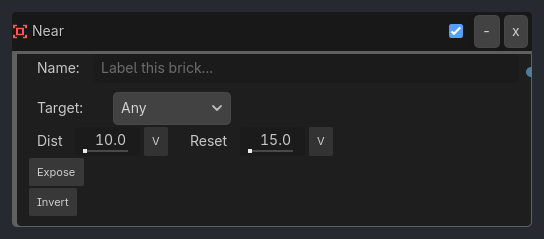
When To Use
1. AI Awareness Zones
Near Listener (Distance: 20.0, Target: "Player")
-> AND Gate
-> Animation Executor (Play: "alert")
Enemy detects player within 20 meters, plays alert animation.
2. Pickup Detection
Near Listener (Distance: 2.0, Group: "items", Expose Data: true)
-> AND Gate
-> Variable Executor (Set Local "nearby_item" from Local "near_closest")
Player gets close to items, stores which item is nearest.
3. Interaction Prompts
Near Listener (Distance: 3.0, Variable: "interactable", Invert: false)
-> AND Gate
-> Visibility Executor (Show: InteractionUI)
Show “Press E to interact” when near interactable objects.
4. Auto-Attack Range (with Hysteresis)
Near Listener (Distance: 10.0, Reset: 15.0, Group: "enemies")
-> AND Gate
-> Animation Executor (Play: "attack")
Start attacking when enemy within 10m, keep attacking until they’re 15m away.
Runtime Behavior
Evaluates: TRUE when any/specific object is within the detection radius
Properties
Property |
Type |
Default |
Notes |
|---|---|---|---|
target_mode |
String, “Any” |
What to detect - Any, Object Name, Group, or Variable |
|
target_name |
String, “” |
Name of specific object (for Object Name mode) |
|
group_name |
String, “” |
Group name to detect (for Group mode) |
|
property_name |
String, “” |
Local or Global variable name (for Variable mode) |
|
property_value |
String, “” |
Expected variable value (for Variable mode) |
|
distance |
Float, 10.0 |
Detection radius in meters/units (0.1-1000.0) |
|
reset_distance |
Float, 15.0 |
Hysteresis distance to prevent flickering (0.1-1000.0) |
|
expose_data |
Boolean, false |
Store detected object data in Local Variables |
|
invert |
Boolean, false |
Trigger when NO objects in range |