Signal
Category: Listener Tier: Basic
Purpose
Detects when a specific Godot signal is emitted by a target node.
Visual Reference
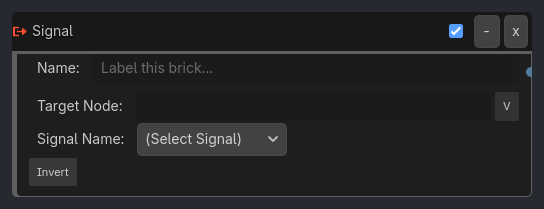
Runtime Behavior
Inputs None.
Outputs
Signal Received (Pulse): True for one tick when the signal is emitted.
Properties
signal_name (signal_dropdown, “”): The name of the signal to listen for (populated from target node’s available signals).
target_node (string, “”): The node to connect to. If empty, connects to the owner node.
Execution Behavior
Connect Logic
On initialization (or when Target Node changes), the listener attempts to connect a
Callableto thesignal_nameof thetarget_node.The
Callablepoints to an internal callback_on_signal_emitted(args).Cleanup: Must disconnect signals in
_exit_treeorNOTIFICATION_PREDELETEto prevent “Attempt to disconnect non-existent signal” errors if target is freed before listener.
Tick Behavior
The listener maintains a
triggered_this_frameflag.The callback sets
triggered_this_frame = true.During
evaluate_sensors, iftriggered_this_frameis true:distinct positive pulse is generated.
triggered_this_frameis reset to false after evaluation (or safely queued for next frame if signal happens mid-tick?).Note: Godot signals happen immediately. If the signal happens during the physics process, we capture it. If it happens outside (e.g. GUI input process), we must store it until the next
evaluate_sensors.
State Changes
Inactive: Not connected or node not found.
Active: Connected and listening.
Examples
Basic Usage
Signal Name:
mouse_enteredTarget Node:
../Button
…
Properties
This brick does not expose a generated property table yet. See the source specification for implementation notes.