Radar
Category: Listener Tier: Basic
Purpose
Detects objects within a cone-shaped field of view (FOV), like a radar or vision cone.
Visual Reference
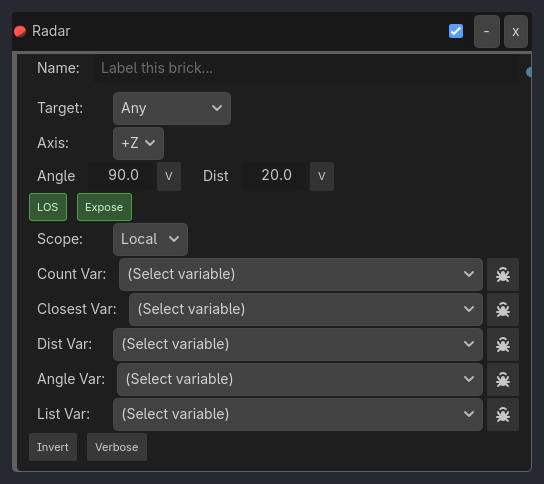
When To Use
1. Enemy AI Vision Cone
Radar Listener (Angle: 60 deg, Distance: 15.0, Group: "player", Expose Data: true)
-> AND Gate
-> Animation Executor (Play: "alert")
-> Property Executor (Set Global "enemy_alerted" = true)
Enemy detects player when in 60 deg FOV, plays alert animation.
2. Security Camera
Radar Listener (Angle: 90 deg, Distance: 20.0, Axis: +Z, LOS: true, Group: "intruders")
-> AND Gate
-> Sound Executor (Play: "alarm.wav")
-> Message Executor (Send: "INTRUDER_DETECTED")
Camera detects intruders in its cone, triggers alarm.
3. Stealth Game - Stay Out of Sight
Radar Listener (Angle: 90 deg, Distance: 10.0, Target: "Player", Invert: true)
-> AND Gate
-> Property Executor (Set Global "is_hidden" = true)
Check if player is NOT in guard’s vision (stealth success).
4. Auto-Aim System
Radar Listener (Angle: 30 deg, Distance: 50.0, Group: "enemies", Expose Data: true)
-> Expression Gate (radar_count > 0)
-> Track To Executor (Target: from Local Variable "radar_closest")
Turret aims at nearest enemy in narrow cone.
5. Peripheral Vision (Wide Cone)
Radar Listener (Angle: 180 deg, Distance: 5.0, Target: "Enemy")
-> AND Gate
-> PRINT Executor ("Enemy behind me!")
Detect enemies in 180 deg hemisphere (front half).
Runtime Behavior
Evaluates: TRUE when any/specific object is within the detection cone
Properties
Property |
Type |
Default |
Notes |
|---|---|---|---|
target_mode |
String, “Any” |
Detection filter - Any, Object Name, Group, or Property |
|
target_name |
String, “” |
Name of specific object (for Object Name mode) |
|
group_name |
String, “” |
Group name to detect (for Group mode) |
|
property_name |
String, “” |
Metadata property name (for Property mode) |
|
property_value |
String, “” |
Expected property value (for Property mode) |
|
axis |
option, “+Z (Forward)” |
Cone direction - +X, -X, +Y, -Y, +Z, or -Z |
|
cone_angle |
Float, 90.0 |
FOV cone angle in degrees |
|
distance |
Float, 20.0 |
Maximum detection range |
|
require_line_of_sight |
Boolean, true |
Require clear raycast (Line of Sight) |
|
expose_data |
Boolean, true |
Store detected object data in Local Variables |
|
visual_debug |
Boolean, false |
Draw detection cone in editor/game for debugging |
|
invert |
Boolean, false |
Trigger when NO objects detected |