Movement
Category: Listener Tier: Basic
Purpose
Detects when an object is moving, stopped, accelerating, or changing direction.
Visual Reference
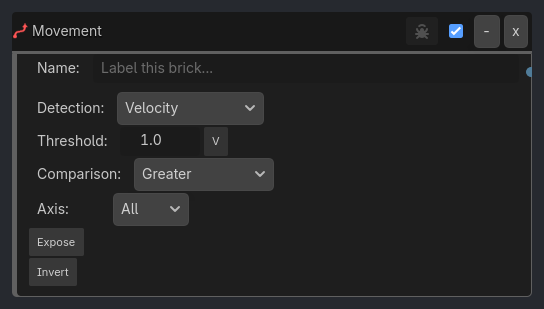
When To Use
1. Animation State Machine (Idle -> Walk -> Run)
**Idle to Walk**
Movement Listener (Mode: Velocity, Threshold: 0.5, Greater)
-> AND Gate
-> Animation Executor (Play: "walk")

**Walk to Run**
Movement Listener (Mode: Velocity, Threshold: 5.0, Greater)
-> AND Gate
-> Animation Executor (Play: "run")

**Back to Idle**
Movement Listener (Mode: Is Stopped, Threshold: 0.1)
-> AND Gate
-> Animation Executor (Play: "idle")
2. Fall Damage Trigger
Movement Listener (Mode: Velocity, Axis: Y Only, Threshold: -15.0, Less, Expose Data: true)
-> Collision Listener (Group: "ground")
-> AND Gate
-> Property Executor (Set Global "player_health" -= abs(movement_velocity.y) * 0.5)
Take damage proportional to fall velocity.
3. Boost Trail Effect
Movement Listener (Mode: Velocity, Threshold: 20.0, Greater)
-> AND Gate
-> Visibility Executor (Show: "BoostTrailParticles")
Show trail particles when moving fast.
4. Direction Change Footsteps
Movement Listener (Mode: Direction Change, Tolerance: 30.0)
-> AND Gate
-> Sound Executor (Play: "footstep_turn.wav")
Play sound when player pivots sharply.
5. Detect Sudden Stop (Car Brakes)
Movement Listener (Mode: Acceleration, Threshold: -10.0, Less, Expose Data: true)
-> AND Gate
-> Sound Executor (Play: "tire_screech.wav")
-> Animation Executor (Play: "brake_lights")
High deceleration triggers brake effects.
6. AFK Detection
Movement Listener (Mode: Is Stopped, Threshold: 0.1)
-> Delay Listener (Duration: 60.0, Repeat: false)
-> AND Gate

...

## Runtime Behavior

**Evaluates**: TRUE when object's movement matches specified criteria

```{raw} html
<div class="illustration-container">
        <div class="illustration-box">
            <div class="box-header">Generated UI Mockup — showing expanded properties</div>
            <div class="real-node brick-listener">
                <div class="real-header">
                    <div class="real-title"><span class="brick-icon-fallback"></span> <span>Movement</span></div>
                    <div class="real-controls"><div class="real-checkbox"></div><div class="real-btn">-</div><div class="real-btn">x</div></div>
                </div>
                <div class="real-inner-panel"><div class="real-row name-row" style="position:relative;"><span class="real-label">Name:</span><div class="real-input" style="color:#666; font-style:italic;">Label this brick...</div><div class="real-port" style="right:-15px;"></div></div><div class="real-inline-row" style="margin-top:4px;"><div class="real-inline-btn">Invert</div></div><div class="real-row"><span class="real-label" style="width:auto; max-width:160px; overflow:hidden; text-overflow:ellipsis;">Detection Mode:</span><div class="real-input" style="flex-grow:0; width:120px; justify-content:space-between; padding:4px 8px;"><span></span><div class="real-input-dropdown-btn" style="padding:2px 6px;">v</div></div></div><div class="real-row"><span class="real-label" style="width:auto; max-width:160px; overflow:hidden; text-overflow:ellipsis;">Threshold:</span><div class="real-input" style="flex-grow:0; width:120px; justify-content:space-between; padding:4px 8px;"><span></span><div class="real-input-dropdown-btn" style="padding:2px 6px;">v</div></div></div><div class="real-row"><span class="real-label" style="width:auto; max-width:160px; overflow:hidden; text-overflow:ellipsis;">Comparison:</span><div class="real-input" style="flex-grow:0; width:120px; justify-content:space-between; padding:4px 8px;"><span></span><div class="real-input-dropdown-btn" style="padding:2px 6px;">v</div></div></div><div class="real-row"><span class="real-label" style="width:auto; max-width:160px; overflow:hidden; text-overflow:ellipsis;">Axis Filter:</span><div class="real-input" style="flex-grow:0; width:120px; justify-content:space-between; padding:4px 8px;"><span></span><div class="real-input-dropdown-btn" style="padding:2px 6px;">v</div></div></div><div class="real-row"><span class="real-label" style="width:auto; max-width:160px; overflow:hidden; text-overflow:ellipsis;">Expose Data:</span><div class="real-input" style="flex-grow:0; width:120px; justify-content:space-between; padding:4px 8px;"><span></span><div class="real-input-dropdown-btn" style="padding:2px 6px;">v</div></div></div><div class="real-row"><span class="real-label" style="width:auto; max-width:160px; overflow:hidden; text-overflow:ellipsis;">Expose Scope:</span><div class="real-input" style="flex-grow:0; width:120px; justify-content:space-between; padding:4px 8px;"><span></span><div class="real-input-dropdown-btn" style="padding:2px 6px;">v</div></div></div><div class="real-row"><span class="real-label" style="width:auto; max-width:160px; overflow:hidden; text-overflow:ellipsis;">Expose Prefix:</span><div class="real-input" style="flex-grow:0; width:120px; justify-content:space-between; padding:4px 8px;"><span></span><div class="real-input-dropdown-btn" style="padding:2px 6px;">v</div></div></div><div class="real-row"><span class="real-label" style="width:auto; max-width:160px; overflow:hidden; text-overflow:ellipsis;">Invert:</span><div class="real-input" style="flex-grow:0; width:120px; justify-content:space-between; padding:4px 8px;"><span></span><div class="real-input-dropdown-btn" style="padding:2px 6px;">v</div></div></div><div class="real-row"><span class="real-label" style="width:auto; max-width:160px; overflow:hidden; text-overflow:ellipsis;">Verbose:</span><div class="real-input" style="flex-grow:0; width:120px; justify-content:space-between; padding:4px 8px;"><span></span><div class="real-input-dropdown-btn" style="padding:2px 6px;">v</div></div></div></div>
            </div>
        </div>
    </div>
Properties
Property |
Type |
Default |
Notes |
|---|---|---|---|
detection_mode |
option, “Velocity” |
What to detect - Velocity, Acceleration, Is Moving, Is Stopped, or Direction Change |
|
threshold |
float, 1.0 |
Minimum value to trigger |
|
comparison |
option, “Greater” |
How to compare - Greater, Greater or Equal, Less, Less or Equal, Equal, or Not Equal |
|
axis_filter |
option, “All” |
Which axes to evaluate - All, X Only, Y Only, Z Only, XY, XZ, or YZ |
|
expose_data |
bool, false |
Store movement data in Local or Global variables |
|
expose_scope |
option, “Local” |
Variable scope used when expose_data is enabled |
|
expose_prefix |
string, “movement” |
Prefix for exposed variable names |
|
invert |
bool, false |
Invert the movement condition |
|
verbose |
bool, false |
Hidden ladybug debug output flag |