XR Movement
Category: Executor Tier: Pro
Purpose
XR analog of Motion3D — handles all player locomotion paradigms by moving/rotating the XROrigin3D.
Visual Reference
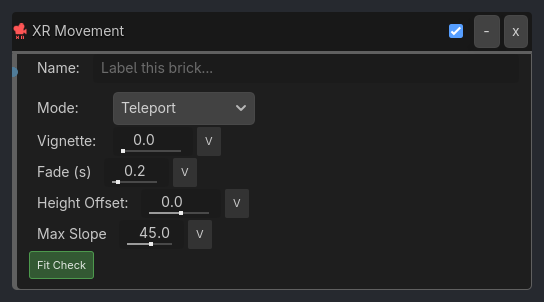
Runtime Behavior
Inputs
Activate (Boolean): When true, apply movement. Joystick-driven modes read analog metadata from upstream XR Input Listener.
Properties
Core (always visible)
movement_mode (Enum, default
"Teleport"):Teleport,Smooth,Snap Turn,Continuous Turn,Climb,Flyvignette_intensity (Float, default
0.0): Comfort tunnel-vision overlay intensity. 0 = disabled.vignette_threshold (Float, default
0.2,visible_if: {vignette_intensity: "> 0"}): Velocity threshold before vignette activates.
Teleport Mode (visible_if: {movement_mode: "Teleport"})
fade_duration (Float, default
0.2): Fade-to-black transition time in seconds.offset_height (Float, default
0.0): Height offset above the hit point.max_slope (Float, default
45.0): Maximum surface angle in degrees (absorbed from demoted Teleport Gate).collision_mask (Bitmask): Valid teleport surface layers (absorbed from demoted Teleport Gate).
check_player_fit (Bool, default
true): Capsule cast to verify player fits at target (absorbed from demoted Teleport Gate).
Smooth / Fly Mode (visible_if: {movement_mode: ["Smooth", "Fly"]})
speed (Float, default
2.5): Movement units per second.orientation (Enum, default
"Hand"):Head,Hand— determines forward direction.input_type (Enum, default
"Joystick"):Joystick,Arm Swing(godot-xr-tools jog/swing detection).sprint_multiplier (Float, default
1.5,visible_if: {input_type: "Joystick"}): Speed boost when sprint button held.
…
Properties
This brick does not expose a generated property table yet. See the source specification for implementation notes.