XR Session
Category: Executor Tier: Pro
Purpose
Manages the XR session lifecycle and global system parameters.
Visual Reference
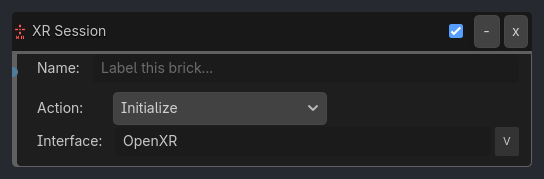
Runtime Behavior
Inputs
Activate (Boolean): Triggers the selected action.
Outputs
Session State (Metadata): Exposes current session state (
IDLE,READY,SYNCHRONIZED,VISIBLE,FOCUSED,STOPPING,LOSS_PENDING,EXITING) as runtime metadata for downstream logic.
Properties
Core (always visible)
action (Enum, default
"Initialize"):Initialize,Shutdown,World Scale,Reset Orientation,Set World Origin,Toggle Interface,Set Refresh Rate,Toggle Foveated Rendering,Set Tracking Mode,Custom Commandinterface_name (String, default
"OpenXR")
Initialize (visible_if: {action: "Initialize"})
simulate_if_unavailable (Bool, default
false): In headless/CI or missing-HMD contexts, log a simulated successful initialization instead of an error. This is for deterministic demo verification only.play_area_mode (Enum, default
"Stage"):Stage,Roomscale,Sitting,3DOF.Stageis the standing/roomscale default because it places Y=0 at the physical floor.disable_vsync (Bool, default
true): Disable window VSync after XR startup so the XR compositor owns frame pacing.
Shutdown
No additional properties. Shutdown calls uninitialize.
World Scale (visible_if: {action: "World Scale"})
scale_factor (Float, default
1.0): Multiplier applied toXROrigin3D.world_scale.
Toggle Interface (visible_if: {action: "Toggle Interface"})
target_interface (String, default
"OpenXR"): Interface to activate/deactivate.
…
Properties
This brick does not expose a generated property table yet. See the source specification for implementation notes.