Material
Category: Executor Tier: Basic
Purpose
Modifies material properties on the object’s mesh/sprite, including color, metallic, roughness, and emission.
Visual Reference
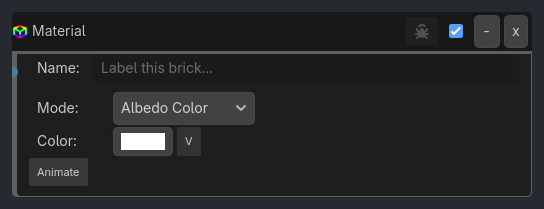
When To Use
Damage feedback (flash red when hit)
Power-up effects (glow when powered)
State indication (green=safe, red=danger)
Environmental lighting (glowing objects)
UI highlighting (hover effects)
Day/night cycles (material color shifts)
Status effects (poison=green tint, frozen=blue tint)
Runtime Behavior
Executes: When activated, changes the specified material property
Properties
Property |
Type |
Default |
Notes |
|---|---|---|---|
property_type |
option, “Albedo Color” |
Which material property to modify (see available properties below) |
|
color_value |
color, Color(1,1,1,1) |
Color to set (for Albedo Color or Emission) |
|
float_value |
float, 0.0 |
Numeric value (for Metallic, Roughness, or Emission Energy) |
|
animate |
bool, false |
Animate the material property transition smoothly |
|
duration |
float, 1.0 |
Animation duration in seconds |
Example Use Cases
Damage Flash:
Collision(Bullet) -> AND -> Material(property=Albedo Color, color=Red)
Delay(10) -> AND -> Material(property=Albedo Color, color=White)
// Flash red for 0.16 seconds when hit
Power-Up Glow:
Sample inspector layout removed for compatibility.
Metallic Transition:
Keyboard(M) -> AND -> Math(metallic_value, Add, 0.1) -> Material(property=Metallic, value=$metallic_value)
// Gradually increase metallic appearance
Traffic Light System:
Property(state, Equal, go) -> AND -> Material(property=Albedo Color, color=Green)
Property(state, Equal, slow) -> AND -> Material(property=Albedo Color, color=Yellow)
Property(state, Equal, stop) -> AND -> Material(property=Albedo Color, color=Red)
Glowing Button:
Sample inspector layout removed for compatibility.