XR Interaction
Category: Executor Tier: Pro
Purpose
Handles all hand-to-object and hand-to-UI interactions: grabbing, throwing, poking, UI pointing, and AR anchor management.
Visual Reference
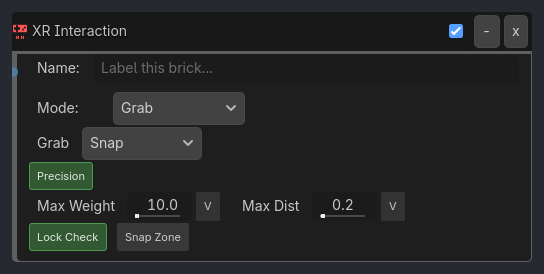
Runtime Behavior
Inputs
Activate (Boolean): Triggers the selected interaction.
Properties
Core (always visible)
interaction_mode (Enum, default
"Grab"):Grab,Release/Throw,Poke,UI Pointer,Anchor
Grab Mode (visible_if: {interaction_mode: "Grab"})
grab_mode (Enum, default
"Snap"):Snap(freeze and drive the object’s world transform from the hand/controller),Physics Joint(6DOF joint for weighted movement)precision_grab (Bool, default
true): Maintain relative offset between hand and object on contact.max_weight (Float, default
10.0): Objects heavier than this are rejected (absorbed from demoted Grab Gate).lock_check (Bool, default
true): Prevent dual-hand conflicts on same object (absorbed from demoted Grab Gate).max_grab_distance (Float, default
0.2): Maximum hand-to-object distance to initiate grab (absorbed from demoted Interaction Gate).snap_zone (Bool, default
false): If true, the grab target is a snap zone — object snaps to zone’s transform on release nearby.Fixture convention: Pickable objects in group
xr_twist_fixtureare constrained fixtures. They remain frozen at their authored origin and rotate around their local grip axis while held instead of being translated or thrown.
Release/Throw Mode (visible_if: {interaction_mode: "Release/Throw"})
velocity_source (Enum, default
"Tracker"):Tracker(current frame velocity),History(averaged over last N frames)throw_multiplier (Float, default
1.0): Scale factor on release velocity.
…
Properties
This brick does not expose a generated property table yet. See the source specification for implementation notes.