Servo
Category: Executor Tier: Plus
Purpose
Applies steering behaviors to a 2D or 3D host: Seek, Flee, Pursue, Evade, Arrive, and Wander.
Visual Reference
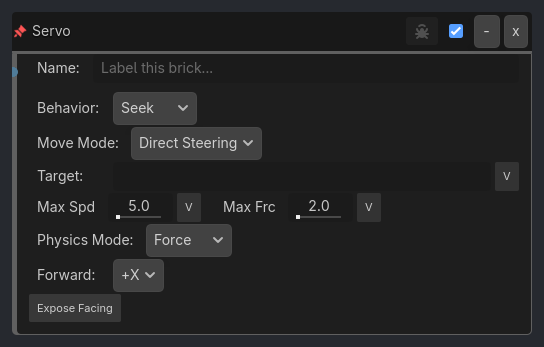
When To Use
Simple enemy chase/flee logic.
Predictive pursue/evade without helper scripts.
Lightweight wander/arrive behavior on CharacterBody or RigidBody hosts.
2D enemies that need to respect NavigationRegion2D corridors and corners.
Runtime Behavior
Resolves the live target each tick.
Falls back to Local/Global variable lookup when direct node lookup fails.
Variable-backed targets may be live node references, paths, or exposed transform vectors such as
{prefix}_position.Computes a desired velocity for the selected behavior.
In
Direct Steering, applies steering force or direct velocity depending onphysics_mode.In
NavMesh 2D, usesNavigationAgent2D.get_next_path_positionto drive the next desired movement vector and follow navigable corners/boundaries.In 2D, rotates the host to face the desired movement direction when
rotate_to_movementis enabled so flee/evade turn away immediately instead of visually backpedaling during reversal. Disabling it keeps Servo as location-only movement without changing object orientation.
Properties
Property |
Type |
Default |
Notes |
|---|---|---|---|
behavior_type |
option, Seek |
Steering behavior. |
|
movement_mode |
option, Direct Steering |
Direct Steering or NavMesh 2D. |
|
target_object |
string, “” |
Target node name/path, or a Local/Global variable that resolves to a node/path or a live Vector2/Vector3 world position. |
|
rotate_to_movement |
bool, true |
When true, 2D hosts rotate to face movement direction. Turn off for location-only movement that preserves the host/sprite orientation. |
|
forward_axis |
option, +X |
+X | -X | +Y | -Y — which local axis is “forward” for facing rotation. Default +X matches legacy behavior; top-down 2D games typically want -Y. (dev7-F H1) |
|
expose_facing |
bool, false |
When true, writes cardinal facing direction into a variable namespace each tick. Sprite executor can read these to swap directional frames. (dev7-F H2) |
|
facing_prefix |
string, “servo” |
Variable namespace for exposed facing. Writes {prefix}_direction_4way (N|E|S|W), {prefix}_direction_8way (N|NE|E|SE|S|SW|W|NW), {prefix}_facing_vector (Vector2). |
|
facing_scope |
option, Local |
Where exposed facing variables are written. |
|
navigation_agent |
string, “” |
Optional NavigationAgent2D node path/name. Empty auto-finds a child agent in NavMesh 2D mode. |
|
max_speed |
float, 5.0 |
Maximum movement speed. |
|
max_force |
float, 2.0 |
Steering-force clamp. |
|
arrival_radius |
float, 2.0 |
[Arrive] stop radius. |
|
slow_radius |
float, 5.0 |
[Arrive] slowdown radius. |
|
wander_radius |
float, 3.0 |
[Wander] wander circle radius. |
|
wander_distance |
float, 5.0 |
[Wander] forward wander projection. |
|
wander_jitter |
float, 1.0 |
[Wander] random angle change per tick. |
|
prediction_time |
float, 1.0 |
[Pursue/Evade] target look-ahead time. |
|
path_desired_distance |
float, 8.0 |
[NavMesh 2D] path-point handoff distance. |
|
target_desired_distance |
float, 12.0 |
[NavMesh 2D] goal completion distance. |
|
physics_mode |
option, Force |
Force or Velocity. |
|
verbose |
bool, false |
Throttled debug logging via the ladybug button. |