Transform3D
Category: Executor Tier: Plus
Purpose
A unified executor for manipulating a 3D object’s position, rotation, and scale.
Visual Reference
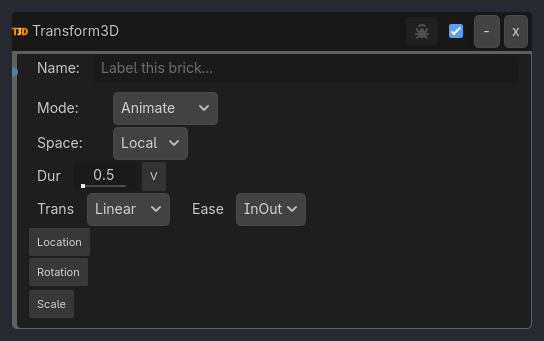
Runtime Behavior
Inputs
Activate (Boolean): Triggers the transform operation.
Properties
Core Configuration
operation (Enum,
Animate)Set: Instantly snaps to target values.Animate: Smoothly tweens to target values overduration.Ping-Pong: Tweens to target, then returns to start.space (Enum,
Local)Local: Relative to parent.Global: Relative to world space.duration (Float,
0.5): Time in seconds forAnimate/Ping-Pong.tween_trans (Enum,
Linear): Transition type.tween_ease (Enum,
InOut): Easing direction.
Transform Channels
Location
enable_loc(Bool,false): Modify location.loc_mode(Enum,Relative):RelativeorAbsolute.loc_axes(Enum,All):All,X,Y,Z,X,Y,X,Z,Y,Z.target_loc(Vector3): Target position.Teleport mapping:
Teleport / Snap=operation = Set,enable_loc = true,loc_mode = Absolutespace = Localteleports relative to the parent transformspace = Globalteleports in world spaceRotation
enable_rot(Bool,false): Modify rotation.rot_mode(Enum,Relative):RelativeorAbsolute.rot_axes(Enum,All):All,X,Y,Z,X,Y,X,Z,Y,Z.target_rot(Vector3): Target rotation in degrees.rot_continuous(Bool,false): Continuous degrees-per-second rotation inRelativemode.Scale
enable_scale(Bool,false): Modify scale.scale_mode(Enum,Absolute):RelativeorAbsolute.
…
Properties
This brick does not expose a generated property table yet. See the source specification for implementation notes.