Path
Category: Executor Tier: Basic
Purpose
Directs objects along curved paths using Godot’s built-in Path3D or Path2D nodes.
Visual Reference
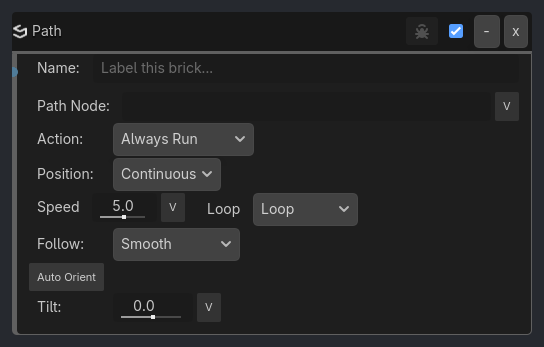
When To Use
Moving platforms patrolling back and forth (
Ping-PongorManualloop mode).Circular saw blades following a track (
Loopmode).Conveyor belt items.
Camera dollies and rail shooters (
Absoluteposition mode with variable-driven progress).Cinematic follow-sequences pointing strictly at a fixed global constraint.
Elevators or doors triggered to move A->B, then B->A on separate events (
Manualloop mode withToggle Directiontrigger).Banked racing vehicles on curves (using
tiltfor visual banking).Cutscene camera positions (using
Absolutemode with progress set via variables or triggers).Random spawn points along a path (
Snap to Pointswithtarget_pointdriven by Random brick).
Properties
Property |
Type |
Default |
Notes |
|---|---|---|---|
path_node |
String, “” |
Target Path3D or Path2D node name. (Specify the node that owns the Curve resource, not a PathFollow child.) |
|
trigger_action |
option, “Always Run” |
Controls execution behavior when triggered: |
|
position_mode |
option, “Continuous” |
Determines how the object is positioned on the path: |
|
progress |
float, 0.0 |
When position_mode is Absolute, sets the normalized position along the curve (0.0 to 1.0). Hidden when in Continuous mode. |
|
movement_speed |
float, 5.0 |
Movement speed along the path in Godot units per second. Ranges from -1000.0 to 1000.0. Supports V/L binding for variable-driven speed control. |
|
loop_mode |
option, “Loop” |
Behavior upon reaching the end of the curve: |
|
follow_mode |
option, “Smooth” |
||
target_point |
int, 0 |
When follow_mode is Snap to Points, specifies which curve point to target by index (0-based). Supports V/L binding for random or variable-driven point selection. Hidden when in Smooth mode. |
|
snap_ease |
option, “Linear” |
When follow_mode is Snap to Points, defines the easing function for interpolation: |
|
auto_orient |
bool, false |
If enabled, matches the object’s rotation to the curve’s direction and applies the curve’s natively baked tilt (up vector). Default is OFF. |
|
orient_axis |
option, “+Z (Forward)” |
Selects which local (or global) axis of the object should point forward along the path (+X, -X, +Y, -Y, +Z, -Z). Only visible when auto_orient is enabled. |
|
orient_space |
option, “Local” |
Defines whether to orient relative to the object’s Local transform or keep movement strictly on the Global XZ floor. Only visible when auto_orient is enabled. |
|
orient_speed |
float, 10.0 |
Slerp interpolation speed for rotation. Set to 0.0 for instant snapping. Only visible when auto_orient is enabled. |
|
tilt |
float, 0.0 |
Rotation around the curve’s tangent axis in degrees. This is independent of auto_orient and allows banking/rolling effects. Ranges from -180.0 to 180.0. Supports V/L binding. |
Example Use Cases
Patrolling Enemy (Automatic Ping-Pong):
Always -> Path Executor (path_node="PatrolPath", speed=5.0, loop_mode="Ping-Pong", auto_orient=true, orient_axis="-Z (Forward)")
// The enemy will march to the end of the line, turn around, and march back repeatedly.
Elevator (Manual Bi-directional):
Keyboard (E) -> Gate (AND) -> Path Executor (path_node="ElevatorPath", trigger_action="Always Run", speed=2.0, loop_mode="Manual")
Keyboard (Q) -> Path Executor (path_node="ElevatorPath", trigger_action="Toggle Direction")
// E: moves elevator along path in current direction (stops at end in Manual mode)
// Q: reverses direction for next E press
Elevator (Start/Stop Control):
Always -> Path Executor (path_node="ElevatorPath", trigger_action="Always Run", speed=2.0)
Keyboard (Space) -> Path Executor (path_node="ElevatorPath", trigger_action="Start")
Keyboard (Space) -> Path Executor (path_node="ElevatorPath", trigger_action="Stop")
// Space: toggles between running and paused states
// Note: First Space triggers both Start and Stop, but Start sets running=true, then Stop sets running=false, so it stops.
// Better pattern: use separate keys or a Variable to track state
Camera Rail (Absolute Positioning):
Variable (camera_progress) -> Path Executor (path_node="CameraTrack", position_mode="Absolute", progress=V:camera_progress)
// Camera position on rail is controlled by the 'camera_progress' variable (0.0 to 1.0).
// Useful for cutscenes or manual camera control.
Banked Racing Kart:
...