State
Category: Gate Tier: Basic
Purpose
Implements a finite state machine (FSM) gate that only activates outputs when in specific states, with bitmask-based state filtering.
Visual Reference
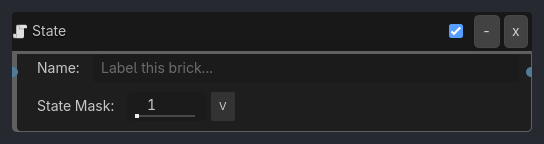
When To Use
Character state machines (idle, walk, run, jump, attack)
Enemy AI states (patrol, chase, attack, retreat)
UI states (main_menu, settings, gameplay, paused)
Animation states (sequence control)
Game flow states (intro, gameplay, victory, game_over)
Runtime Behavior
Triggers: When the object’s current state matches the gate’s state mask
Properties
Property |
Type |
Default |
Notes |
|---|---|---|---|
state_mask |
State Mask, default 1 |
30-bit mask of states that allow the gate to pass. State 0 = bit 0 / value 1, state 1 = bit 1 / value 2, state 2 = bit 2 / value 4, and so on. |
Example Use Cases
Character State Machine:
// Define states:
// 0 = idle
// 1 = walking
// 2 = running
// 3 = jumping

// Idle state
State(current=0, mask=0b0001) -> Animation(idle)

// Walking state
State(current=1, mask=0b0010) -> Motion(walk_speed)

// Running state
State(current=2, mask=0b0100) -> Motion(run_speed)

// Jumping state
State(current=3, mask=0b1000) -> Motion(jump)
State Transitions:
Sample inspector layout removed for compatibility.
Multiple States Active:
// Gate activates in BOTH idle AND walking states
State(mask=0b0011) -> Animation(upper_body_idle)
// Allows upper body idle animation while lower body walks