Motion2D

Category: Executor Tier: Basic

Purpose

The Motion2D executor provides 2D-specific motion and physics for Node2D-based objects.

Visual Reference

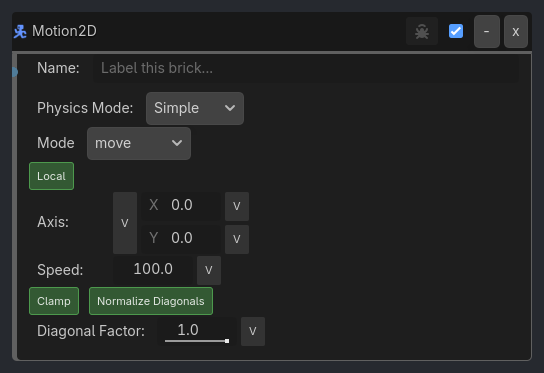
As added to your scene
Motion2D brick as it appears in the GDLink editor

Runtime Behavior

Inputs

  • Activate (Boolean): When true, applies motion; when false, motion stops.

Outputs None.

Properties

Universal (all modes and types)

Property

Type

Default

Description

physics_mode

Option

Simple

Physics system: Simple / Force / Velocity / Character

motion_type

Option

move

Motion type: move / rotate / Top-Down

use_local_space

Bool

true

Local space (true) or world space (false)

vector

Vector3

(0,0,0)

Move/Top-Down: X=right, Y=up (intuitive). Rotate: Z=rotation speed (deg/sec)

speed

Float

100.0

pixels/sec (move) or deg/sec (rotate)

Conditional — Simple+move and Simple+Top-Down only

Property

Type

Default

Description

clamp_input

Bool

true

Clamp X/Y to -1..1 range

normalize_diagonal_speed

Bool

true

Prevent √2 speed boost on diagonal input

diagonal_speed_factor

Float

1.0

Scale diagonal speed (0.1–1.0)

Conditional — Character+move and Character+Top-Down only

Property

Type

Default

Description

clamp_input

Bool

true

Clamp X/Y to -1..1 range (also Velocity mode)

character_add

Bool

false

Add to existing velocity (true) or replace (false)

Conditional — Character+move only

Property

Type

Default

Description

character_jump

Bool

false

Enable jump input

Generated UI Mockup — showing expanded properties
Motion2D
-
x
Name:
Label this brick...
Physics Mode:
Simple
Axis:X
0
v
Y
0
v
Speed:
100.0
v
Diagonal Factor:
1.0
v
Mode
move
Local
Clamp
Add Movement
Jump Input
Cooldown
0.05
v
Jump Frc
400.0
v
Max Jumps
1
v
Normalize Diagonals
Verbose

Properties

Property

Type

Default

Notes

Physics Mode

option

Simple

Simple: direct/non-physics movement. Force/Velocity: RigidBody2D. Character: CharacterBody2D. Use Top-Down here for floating 2D movement with collisions.

Mode

option

move

move: translate in X/Y. Top-Down: top-down move surface (best with Character mode; behaves like move in Simple/Velocity). rotate: 2D rotation uses Z only.

Local

bool

True

True: Move relative to object’s rotation. False: Move in world space.

Axis

vector3

[0, 0, 0]

move/Top-Down use X and Y. rotate uses Z only for 2D rotation speed (deg/sec).

Speed

float

100.0

Movement speed (pixels/sec) or rotation speed (deg/sec).

Clamp

bool

True

Clamp vector X/Y to -1..1 (direction only, speed controls magnitude).

Normalize Diagonals

bool

True

Keep the same speed when moving diagonally (prevents √2 boost).

Diagonal Factor

float

1.0

Scale diagonal speed (1.0 = same as single direction, 0.7 = slower).

Add Movement

bool

False

Add to existing velocity instead of replacing (CharacterBody2D).

Jump Input

bool

False

Make character jump (CharacterBody2D).

Jump Frc

float

400.0

Jump velocity (pixels/sec) for Character mode.

Max Jumps

int

1

Maximum jump count (1=single, 2=double, 3=triple… 9999=infinite).

Cooldown

float

0.05

Time (seconds) before jumping again (0.0 = instant).

Verbose

bool

False

Log motion mode, vector, and speed each tick (controlled by ladybug button)