Mouse

Category: Executor Tier: Basic

Purpose

Native mouse-control surface for the shipped runtime-safe mouse input use case: - FPS-style mouse look on Node3D Saved scenes that use Cursor Visibility remain supported, but new cursor graphics, visibility, confinement, capture, and animation work should use Cursor Executor.

Visual Reference

As added to your scene
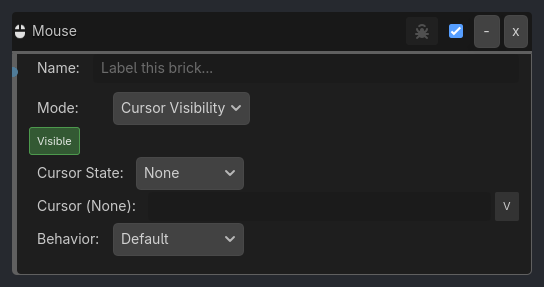
Mouse brick as it appears in the GDLink editor
Generated UI Mockup — showing expanded properties
Mouse
-
x
Name:
Label this brick...
Mode:
Cursor Visibility
Cursor State:
None
Cursor (None):
v
Cursor (Over):
v
Cursor (Press):
v
Cursor (Release):
v
Behavior:
Default
Activation:
Always
Pivot Node:
v
Axis:
Both
Sensitivity:
0.2
v
Min Pitch:
-90.0
v
Max Pitch:
90.0
v
Smoothing:
0.0
v
Hover Action:
Scale
Scale Factor:
1.2
v
Button:
Left
Click Action:
Color
Move Speed:
5.0
v
Stop Distance:
0.5
v
Navigation:
Direct
Visible
Reset Cam
Invert Y
Capture Mouse
Auto Revert
Verbose

Properties

Property

Type

Default

Notes

Event

option

Left Button

Type of mouse event to detect

Input

option

On Press

When to trigger (for button events)

Tap Mode

bool

False

Trigger once per click (prevents multi-firing). Enable for single-click behavior

Move Thresh

float

1.0

Minimum pixel movement to trigger (for Movement events)

Wheel Sens

float

1.0

Wheel scroll sensitivity multiplier (for Wheel events)

Expose Data

bool

False

Write mouse position, world position, delta, and wheel values into variables

Expose Scope

option

Local

Where exposed mouse variables are written

Position Var

variable_name

Variable that receives screen/viewport mouse position

World2D Var

variable_name

Variable that receives 2D world mouse position

Delta Var

variable_name

Variable that receives mouse delta

Wheel Var

variable_name

Variable that receives wheel delta

X Var

variable_name

Variable that receives mouse screen X

Y Var

variable_name

Variable that receives mouse screen Y

World X Var

variable_name

Variable that receives 2D world X

World Y Var

variable_name

Variable that receives 2D world Y

Delta X Var

variable_name

Variable that receives mouse delta X

Delta Y Var

variable_name

Variable that receives mouse delta Y

Expose Prefix

string

mouse

Compatibility fallback when explicit output variables are empty

Lock Center

bool

False

Capture mouse to center (FPS Mode)

Confine

bool

False

Keep mouse within window (RTS Mode)

Notes

  • This brick is not the dialogue/typewriter surface and is not the drag/drop authoring surface.

  • If future mouse gameplay flows are shipped, they should get explicit runtime implementation plus a second P3 pass instead of silently reusing the old placeholder fields.


Last Updated: 2026-04-18