Edit Object

Category: Executor Tier: Plus

Purpose

Perform bounded scene-tree operations at runtime without dropping into custom script glue.

Visual Reference

As added to your scene
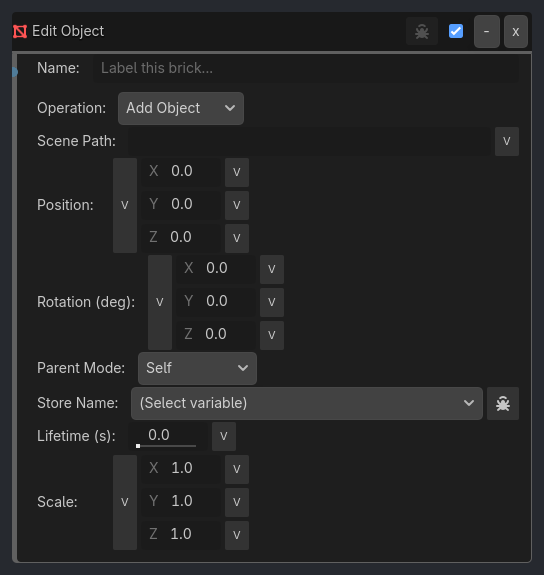
Edit Object brick as it appears in the GDLink editor
Generated UI Mockup — showing expanded properties
Edit Object
-
x
Name:
Label this brick...
Operation:
Add Object
Scene Path:
v
Position:X
0
v
Y
0
v
Z
0
v
Rotation (deg):X
0
v
Y
0
v
Z
0
v
Parent Mode:
Self
Parent Path:
v
Lifetime (s):
0.0
v
Object Name:
self
v
Mesh Path:
v
Scale:X
1
v
Y
1
v
Z
1
v
Target Mode:
Object
Target Object:
v
Target Position:X
0
v
Y
0
v
Z
0
v
Track Axis:
-Z
End Children
Verbose

Properties

Property

Type

Default

Notes

Operation

option

Add Object

Object operation

Scene Path

string

[Add Object] Path to .tscn file to instantiate

Position

vector3

[0, 0, 0]

[Add Object] Spawn position offset from spawn node (X/Y/Z)

Rotation (deg)

vector3

[0, 0, 0]

[Add Object] Spawn rotation offset in degrees

Parent Mode

option

Self

[Add Object] Where to parent spawned object

Parent Path

string

[Add Object] NodePath or name for Named Node parent mode

Store Name

variable_name

[Add Object] Store spawned node name in a local variable

Lifetime (s)

float

0.0

[Add Object] Auto-delete spawned node after N seconds (0 = never)

Object Name

string

self

[End Object] Name/path of object to delete (self = owner, * = wildcard prefix)

End Children

bool

True

[End Object] queue_free the target itself (True) or only its children (False)

Mesh Path

string

[Replace Mesh] Path to mesh resource (.tres or .res)

Scale

vector3

[1, 1, 1]

[Set Scale] New scale to apply (works on Node2D and Node3D)

Target Mode

option

Object

[Track To] Track a named object or a fixed world-space position

Target Object

string

[Track To] Name/path of the object to face

Target Position

vector3

[0, 0, 0]

[Track To] World-space position to face

Track Axis

option

-Z

[Track To] Which axis on this node points at the target

Verbose

bool

False

Log operation details to console (controlled by ladybug button)

Notes

  • This spec reflects the current gameplay-first shipped surface, not the older design-era “mirror everything” plan.

  • Deep engine authoring stays in the native Godot inspector when it is outside the narrow runtime-control surface GDLink is intended to expose.


Last Updated: 2026-06-01 Version: v0.9.3-dev2