Visibility
Category: Executor Tier: Basic
Purpose
Shows or hides the object (and optionally its children) by toggling visibility.
Visual Reference
As added to your scene
When To Use
Hide objects until needed (reveal on trigger)
Toggle UI elements (show/hide menus)
Invisibility power-ups
Hide dead enemies
Show/hide debug visualizations
Flickering effects (with Delay listener)
Cutscene object reveals
Runtime Behavior
Executes: When activated, sets the object’s visibility to the specified state
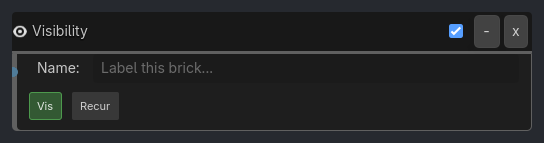
Generated UI Mockup — showing expanded properties
Visibility
-
x
Name:
Label this brick...
v
v
Properties
Property |
Type |
Default |
Notes |
|---|---|---|---|
visible |
bool, true |
Show (True) or hide (False) the object |
|
recursive |
bool, false |
If True, also show/hide all child nodes |
Example Use Cases
Toggle Object Visibility:
Keyboard(H) -> AND -> Visibility(visible=false)
Keyboard(S) -> AND -> Visibility(visible=true)
// Hide with H key, show with S key
Hide Dead Enemy:
Property(HP, Less or Equal, 0) -> AND -> Visibility(visible=false)
// Hide when health reaches zero
Flickering Light:
Delay(30, repeat=true) -> AND -> Visibility(visible=toggle)
// Toggle visibility every 0.5 seconds (flickering effect)
Reveal Collectible:
Property(quest_complete) -> AND -> Visibility(visible=true, recursive=true)
// Show collectible and all child particles when quest completes
Invisibility Power-Up:
Collision(PowerUp) -> AND -> Visibility(visible=false)
Delay(300) -> AND -> Visibility(visible=true)
// Turn invisible for 5 seconds after collecting power-up