Message
Category: Executor Tier: Basic
Purpose
Sends messages to other objects via the MessageBus system, enabling object-to-object communication and event broadcasting.
Visual Reference
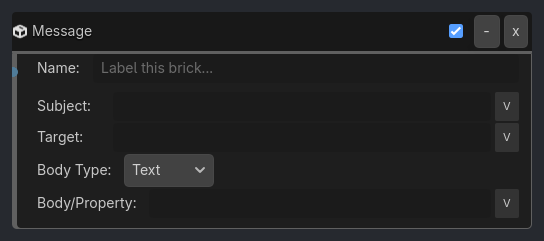
When To Use
Event broadcasting (boss dies -> trigger cutscene)
Combat systems (projectile hits -> deal damage)
UI updates (score changes -> update HUD)
Quest systems (item collected -> check completion)
State synchronization (button pressed -> open door)
Audio cues (footstep -> play sound at location)
Object spawning (enemy dies -> spawn loot)
Runtime Behavior
Executes: When activated, broadcasts a message to specified recipients
Properties
Property |
Type |
Default |
Notes |
|---|---|---|---|
subject |
string, “” |
Message channel/topic (e.g., “hit”, “door_open”, “player_died”) |
|
body |
string, “” |
Message payload/data (optional, can be empty or contain values) |
|
target_object |
string, “” |
Specific object name to send to (empty = broadcast to all) |
|
scope |
option, “Global” |
Global: MessageBus. Local: Direct to object (if target specified) |
Example Use Cases
Broadcast Boss Death:
Property(HP, Less or Equal, 0) -> AND -> Message(subject=boss_defeated, body="", target=All)
// Multiple listeners:
// - Music system plays victory theme
// - UI shows completion message
// - Door unlocks
Deal Damage:
Collision(Player) -> AND -> Message(subject=damage, body=25, target=Player)
// Sends damage value to player object
Door Button System:
// Button object:
Collision(Player) -> AND -> Message(subject=door1_open, body="", target=Door1)

// Door object:
Message_Listener(subject=door1_open) -> AND -> Motion(move_up)
Score Update:
Collision(Collectible) -> AND -> Message(subject=score_update, body=100, target=HUD)
// Tells HUD to add 100 points
Quest System:
Sample inspector layout removed for compatibility.