XR Haptic
Category: Executor Tier: Pro
Purpose
Triggers vibration feedback on XR controllers.
Visual Reference
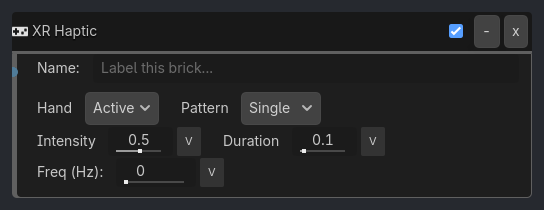
Runtime Behavior
Inputs
Activate (Boolean): Triggers the haptic pulse.
Properties
target_hand (Enum, default
"Active"):Left,Right,Both,Active(the controller that triggered activation)intensity (Float, default
0.5): Vibration strength (0.0-1.0).duration (Float, default
0.1): Pulse length in seconds.frequency (Float, default
0.0): Resonant frequency in Hz (0 = device default; requires hardware support).pattern (Enum, default
"Single"):Single,Double,RampSingle: One pulse at specified intensity/duration.Double: Two short pulses separated by a gap (duration/3 each, gap = duration/3).Ramp: Linearly ramp intensity from 0 tointensityoverduration.
Properties
This brick does not expose a generated property table yet. See the source specification for implementation notes.