Delay
Category: Listener Tier: Basic
Purpose
Waits a specified number of ticks before activating, optionally staying active for a duration, with optional repeating.
Visual Reference
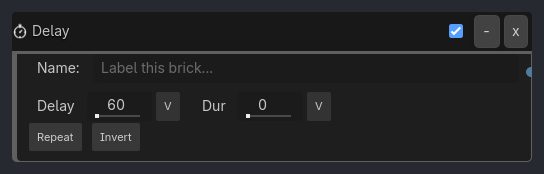
When To Use
Delayed actions (enemy spawns after 5 seconds)
Cooldown timers (ability can’t be used again for 3 seconds)
Timed events (door closes after 2 seconds)
Pulsing effects (flash light every 0.5 seconds with repeat=true)
Runtime Behavior
Triggers: After delay ticks elapse, stays active for duration ticks (or 1 tick if duration is 0), then optionally repeats
Properties
Property |
Type |
Default |
Notes |
|---|---|---|---|
delay |
int, 60 |
Wait this many ticks before triggering (60 ticks ? 1 second at 60 FPS) |
|
duration |
int, 0 |
Stay active for this many ticks (0 = trigger once for 1 tick) |
|
repeat |
bool, false |
Restart the delay/duration cycle after completion |
Example Use Cases
Basic Delay:
Always -> AND -> Delay(delay=120) -> Motion
// Wait 2 seconds, then move once
Repeating Timer:
Delay(delay=30, duration=0, repeat=true) -> AND -> Visibility
// Toggle visibility every 0.5 seconds
Cooldown System:
Keyboard(Space) -> AND -> Delay(delay=180, duration=0) -> Sound
// Jump sound can only play once every 3 seconds