Timer
Category: Executor Tier: Basic
Purpose
Controls a typed Timer variable directly.
Visual Reference
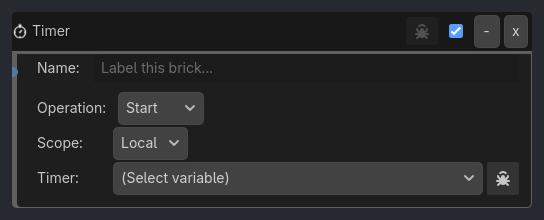
Runtime Behavior
Executes once when activated by a gate.
Reads the selected
Timervariable, mutates its saved state, and writes it back.Start/Resumesetrunning=true, paused=false.Stopclears bothrunningandpaused.Pausesetspaused=true, running=false.Resetclears elapsed/capture state and stops the timer.Capturerecords the current elapsed time into the timer’s lap/split snapshot fields.Does not create display text by itself.
Does not target other scene nodes in this wave; the authored scope + variable name are the address.
Count Down stores elapsed time internally but display/evaluation uses
duration_seconds - elapsed_seconds, clamped at zero.
Properties
Property |
Type |
Default |
Notes |
|---|---|---|---|
operation |
option, Start |
One of Start, Stop, Pause, Resume, Reset, or Capture. |
|
scope |
Local or Global |
where the Timer variable lives. |
|
timer_variable |
String, “” |
target Timer variable name. |
|
verbose |
Bool, false |
Hidden ladybug-controlled debug output. |
Example Use Cases
Race Timer HUD
Timer Variable:
 Name = race_timer
 Mode = Count Up

Start Button / Delay -> Gate -> Timer(Start, Local, race_timer)
Reset Button / Delay -> Gate -> Timer(Reset, Local, race_timer)
Lap Button / Delay -> Gate -> Timer(Capture, Local, race_timer)

Label Executor:
 Variable = race_timer
 Scope = Local
 Target Node = RaceTimerLabel
Control UI Countdown
UI Click(StartButton) -> Gate -> Timer(Start, Local, ui_countdown)
UI Click(ResetButton) -> Gate -> Timer(Reset, Local, ui_countdown)
Variable(Local, ui_countdown, timer_field=remaining_seconds, Less or Equal, 0) -> Gate -> Scene(Load Scene, GameOver)
Label(Set, variable=ui_countdown) drives the HUD text.