UI Parameters

Category: Executor Tier: Basic

Purpose

Reads from and writes to Godot Control nodes at runtime.

Visual Reference

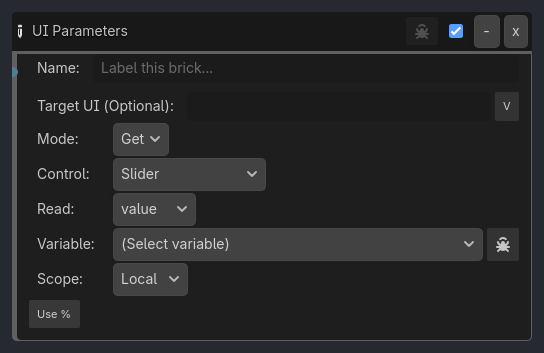
As added to your scene
UI Parameters brick as it appears in the GDLink editor
Generated UI Mockup — showing expanded properties
UI Parameters
-
x
Name:
Label this brick...
Target UI (Optional):
v
Mode:
Get
Control:
Slider
Read:
value
Read:
selected_index
Scope:
Local
Text:
v
Value:
0.0
v
Max Value:
100.0
v
Property:
text
v
Type:
String
Int Val:
0
v
Vec X:
0.0
v
Vec Y:
0.0
v
Checked
%
Verbose

Properties

Property

Type

Default

Notes

Target UI (Optional)

string

Leave empty to target the Control that owns this graph. Set a relative path only when intentionally driving a different Control.

Mode

option

Get

Get reads from UI → variable; Set writes variable/literal → UI

Control

option

Slider

Type of UI Control node

Read

option

value

Read raw value, ratio (0.0-1.0), or percent (0-100) from a Range control

Read

option

selected_index

Read selected index (int) or selected text (string)

Variable

variable_name

Variable to store the read value

Scope

option

Local

Variable scope

Text

string

Text value to set on the control

Value

float

0.0

Numeric value to set on the control (raw source value when Use % is enabled)

Checked

bool

False

Toggle state to set

Color

color

[1, 1, 1, 1]

Color value to set

Use %

bool

False

Scale raw values against Max Value. Get stores 0-100; Set writes a scaled percent into the control range.

Max Value

float

100.0

Reference max for percent conversion (for example: max health = 2500)

Verbose

bool

False

Log UI Parameters operations (controlled by ladybug button)

Property

string

text

[Legacy] Raw property name

Type

option

String

[Legacy]

Int Val

int

0

[Legacy]

Vec X

float

0.0

[Legacy]

Vec Y

float

0.0

[Legacy]