Sprite
Category: Executor Tier: Basic
Purpose
Controls 2D sprite properties including frame animation, texture swapping, and sprite sheet manipulation.
Visual Reference
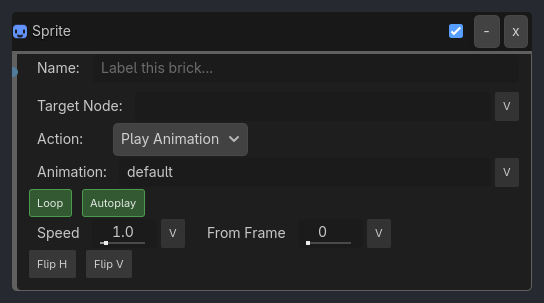
When To Use
Frame-by-frame animation control
Character state sprites (idle, walk, run frames)
UI element changes (button states)
Texture swapping (equipment changes, damage states)
Sprite sheet navigation
Dialogue portraits (expression changes)
Runtime Behavior
Executes: When activated, performs the specified sprite operation
Properties
Property |
Type |
Default |
Notes |
|---|---|---|---|
action |
option, “Set Frame” |
Sprite operation to perform (see available actions below) |
|
frame |
int, 0 |
[Set Frame] Target frame index |
|
texture_path |
string, “” |
[Set Texture] Path to texture resource (e.g., res://path/to/texture.png) |
|
flip_h |
bool, false |
Flip the target sprite horizontally. Supports Local/Global boolean variable binding for facing logic. |
|
flip_v |
bool, false |
Flip the target sprite vertically. Supports Local/Global boolean variable binding for facing logic. |
Example Use Cases
Manual Frame Animation:
Delay(10, repeat=true) -> AND -> Sprite(action=Next Frame)
// Advance one frame every 0.16 seconds (10 ticks)
Character Walking Cycle:
Sample inspector layout removed for compatibility.
Set Specific Frame:
Property(state, Equal, idle) -> AND -> Sprite(action=Set Frame, frame=0)
Property(state, Equal, walk) -> AND -> Sprite(action=Set Frame, frame=1)
Property(state, Equal, run) -> AND -> Sprite(action=Set Frame, frame=2)
// Set different frames for different states
Weapon Swap (Texture Change):
Keyboard(1) -> AND -> Sprite(action=Set Texture, texture_path="res://weapons/sword.png")
Keyboard(2) -> AND -> Sprite(action=Set Texture, texture_path="res://weapons/bow.png")
// Swap between weapon sprites
Damage State:
Property(HP, Less, 30) -> AND -> Sprite(action=Set Texture, texture_path="res://player_damaged.png")
// Change to damaged sprite when low HP