Gamepad
Category: Listener Tier: Basic
Purpose
Detects gamepad input across buttons, D-Pad directions, analog stick axes, and analog triggers.
Visual Reference
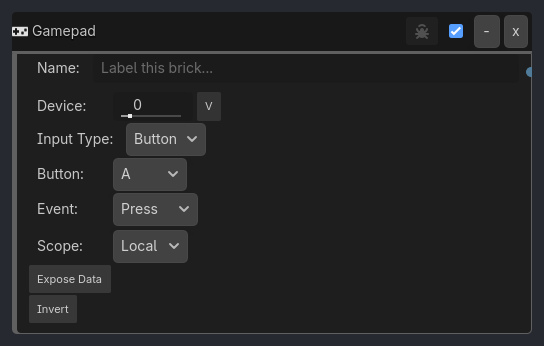
When To Use
Character Movement
Gamepad(Axis Left Stick X Any, expose=move_x) -> Motion(vector.x = {move_x})
Gamepad(Axis Left Stick Y Any, expose=move_z) -> Motion(vector.z = {-move_z})
Vehicle Steering / Throttle
Gamepad(Axis Left Stick X Any, expose=steer_cmd) -> Vehicle3D(steer_input = {steer_cmd})
Gamepad(Trigger RT Hold, expose=throttle_cmd) -> Vehicle3D(throttle_input = {throttle_cmd})
Gamepad(Trigger LT Hold, expose=brake_cmd) -> Vehicle3D(brake_input = {brake_cmd})
Menu Navigation
Gamepad(D-Pad Up Press) -> PRINT / Variable / Message
Gamepad(D-Pad Down Press) -> PRINT / Variable / Message
Gamepad(Button A Press) -> confirm
Gamepad(Button B Press) -> back
Runtime Behavior
Button Uses native joy button state and edge tracking.
Press: true once when the button goes from up to downRelease: true once when the button goes from down to upHold: true continuously while the button remains down
D-Pad Uses the same native button-state edge logic as standard buttons.
Press: fires when the selected D-Pad direction first engagesRelease: fires when that direction is releasedHold: stays true while the direction is held
Axis Reads the configured stick axis, applies dead-zone filtering, then evaluates against the selected direction and threshold.
Positive: active whenaxis_value > thresholdNegative: active whenaxis_value < -thresholdAny: active whenabs(axis_value) > threshold
Axis now supports full analog edge tracking:
Press: fires once when the filtered value crosses into the active threshold regionRelease: fires once when it exits that threshold regionHold: stays true while it remains inside that region
Trigger
Reads the configured trigger axis, applies dead-zone filtering, then compares against axis_threshold.
Press: fires once when trigger value crosses above thresholdRelease: fires once when it falls back below thresholdHold: stays true while above threshold
Properties
This brick does not expose a generated property table yet. See the source specification for implementation notes.
Notes
Dead-zone values near
0.1.. 0.2are usually appropriate for healthy controllers.Larger dead-zones can hide stick drift on worn hardware.
Trigger thresholds around
0.1.. 0.3feel responsive for brake/throttle style input.For clean logs on
Hold, use aDelaylistener into the same gate to throttle output.
Last Updated: April 18, 2026 Version: v0.8.98.2-dev1